• Diversity and Inclusion in the BizzApps community and community leadership
    It’s been bothering me for quite a long time now. So, I would like to start the discussion on this topic with the hope to find some sort of solution to the problem with the help of the collective.

    The simple binary model of the tech community contribution – labeling members as “active” or “passive”, “leaders” or “followers” – could be fundamentally wrong. I came to this conclusion and it based on my personal experience and watching other people having similar issues.

    We make the assumption that all disengaged people are disengaged by choice.

    I propose a new assumption: we could engage more people into the community leadership and make the leadership more diverse by making the rules, the recognition model and the environment more inclusive.

    A long time ago I read the amazing article explaining how to discover the real company values by asking these three simple questions:

    1) Who do we hire?

    2) Who do we fire?

    3) Who do we reward?

    When we apply this test to our community and its active part, leadership, we discover the real values of the community. Are we inclusive? Are we diverse? Does the leadership part of the community fully represents the community?

    A good friend of mine, a man, supports Women In Tech movement. He got himself in trouble by trying to point to a very simple thing and he probably thinks I didn’t listen too. But I did. He said: “Why do you need to change to be accepted?” I was thinking about it.

    It’s very common for Women In Tech community to state “we have to change” as something which is “obvious” and absolutely “must happen”. To be included you have to change. It sounds ridiculous but people agree with the statement. It kills the benefits of the diversity which claims we benefit from people being DIFFERENT and INCLUDED.

    Unfortunately, I have to disappoint my friend again, I don’t see any other way for “underrepresented” groups of people to be included – we have to change. It may partly work for neurodiverse people, they do it whole entire life anyway – trying to pretend to fit in. It may partly work for women – they will continue to copy the “men style of leadership”.

    But do we all have an ability to change to “comply”? How about skin color, ethnical background, disability, and different life conditions, different variables of the “exclusion equation”?

    As always, it is a little bit of the “chicken-egg” type of problem. To understand how to change the rules and processes we need a more diverse crowd and to get a diverse crowd we need to change the rules and processes.

    So my questions and something I’d like to explore:

    1) What kind of activities and types of the contribution could we bring to engage more “different” people? For example, in the Women In Tech community how do we engage working mums struggling with the time restrictions?

    2) How to make community activities more inclusive? Most of the live community events are noisy which aren’t neurodiversity-friendly, don’t have quiet rooms, for example. Most of the live community events don’t have childcare facilities available.

    3) What do we count as the contribution and how much is too much? One hour of a contribution could be a big deal for a full-time working mum of three trying to spare her time to stay engaged. One hour of someone’s time spent in a smart way could be more valuable than tonnes of “entertaining” educational videos.

    4) How about people with disabilities? I want to learn how it looks like from their side?

    I hope to find some answers to these questions during the next year.

  • In a Canvas app, if you pick up a CDS entity as a data source, in my case, a Contact entity, you can also pick up a view.

    If you pick up None as per screenshot below, it will retrieve you an unfiltered set of records.

    pic1

    Here you can see all my CDS contacts in the gallery.

    pic2

    Let’s say we want to use a custom view to pre-filter our data in the Canvas app. Why it’s good? It looks like something you could use for consistency.

    Setting up rules on CDS will allow you to modify it in one place in the future if you decide to change filtering criteria. If you use the same filtering rules to define your data source in multiple apps, including model-driven, instead of defining those rules in each app, you could do it once in CDS.

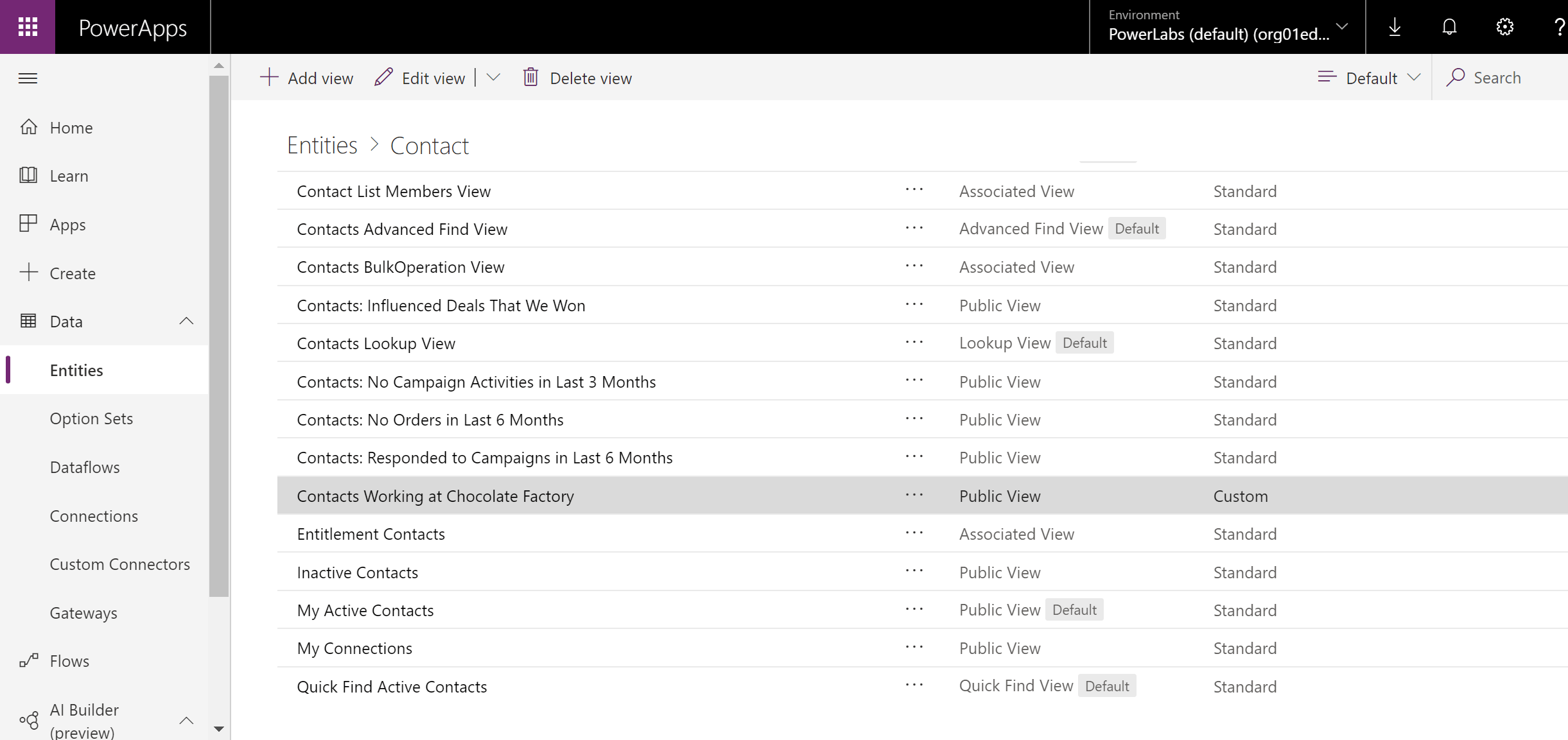
    Let’s see how it works. Let’s create a view for all contacts in the system working for the Chocolate Factory company. In CDS -> Data -> Entities for a Contact entity click on Add view.

    pic3

    Here we define columns, sorting rules and filters.

    pic4

    For the filter, we add “Company Name contains ‘Chocolate Factory’” and save. We have to publish changes in CDS.

    pic5

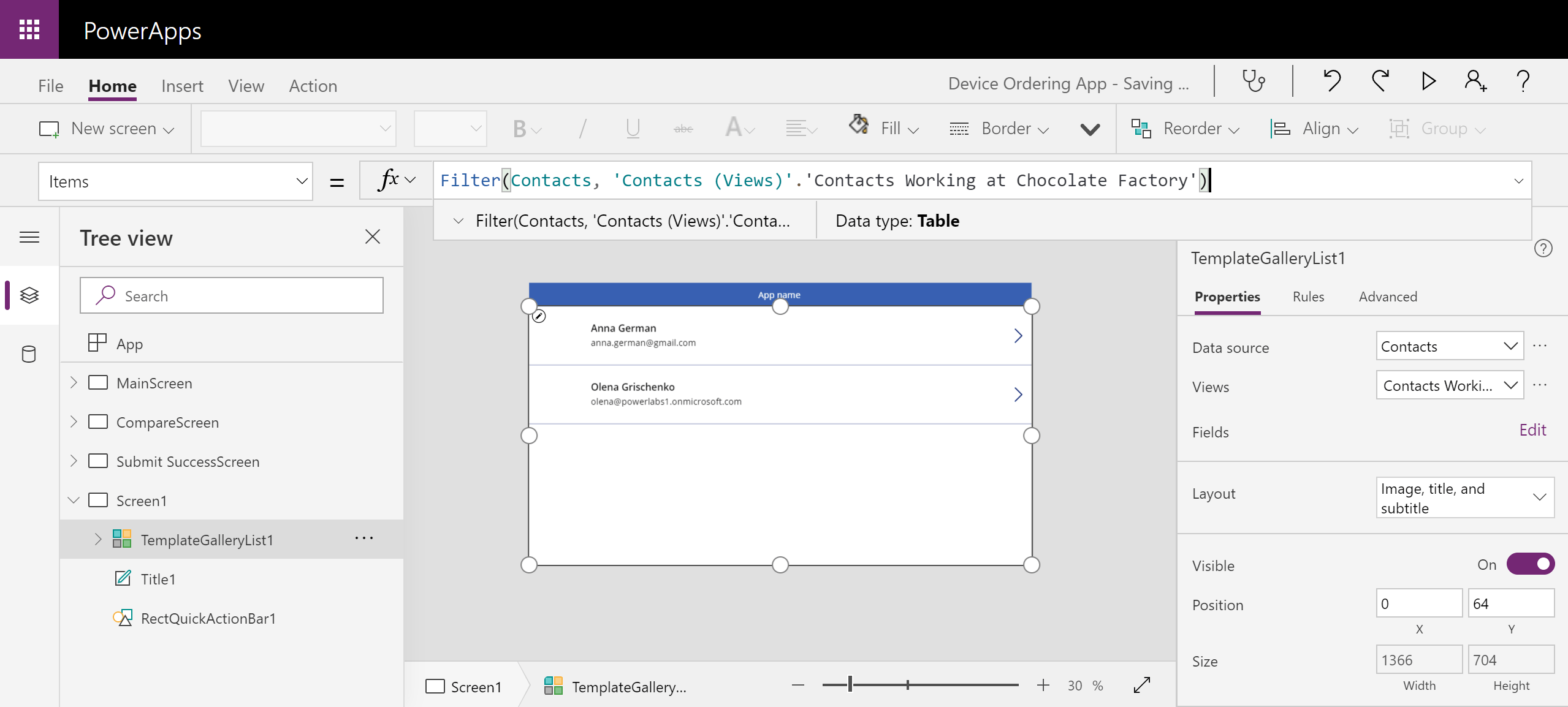
    Then in our Canvas app, we select a new view we’ve just created from the list of available views.


    pic6

    As you can see, data gets filtered to only display contact with the Company Name set to “Chocolate Factory…”. Note gallery property Items expression is:

    Filter(Contacts, ‘Contacts (Views)’.’Contacts Working at Chocolate Factory’)

    pic7

    Now if you want to change the filtering condition for your data source you don’t need to change your app.


  • Don’t auto-convert. Think. Transform.

    Why am I not a fan of auto converters which allow you to magically turn something old into something new? In the context of Dynamics 365, old Java Script into a new format, SQL reports into FetchXML, workflows into Flows etc. It’s because I believe that “new” is not just about tools, it’s about the evolution of the way we approach things, solve problems and design solutions.

    Every single “magical” conversion tool I tried in my long developer life turned to be 80% magical. It really saves you that 20% of the time. The rest of the conversion takes…. you know the rule.

    Dragging the old way of thinking, outdated processes and heavily customized solutions into a new world doesn’t look like a good idea to me. It still requires significant investments but it doesn’t offer any benefits in return.

    Therefore, it makes more sense to focus on revisiting requirements and reviewing processes instead. Is the solution still valid for your business in general? Maybe it’s better to even put some bits and pieces in a rubbish bin because the old logic is not applicable any more or discovering a freshly built out of the box functionality which made the old customisation redundant.

    If we remove an “auto” component and add a “human” component instead, in this case, conversion becomes a transformation with the support of change management, strategical planning and roadmaps. Even though it seems like we don’t have too much of a control, sometimes we don’t need much, really. All we need is just a courage to accept changes and drive the best business outcomes, finding and claiming all benefits.

    Assuming our existing solution still meets all business requirements and we don’t expect it to change in terms of business logic, the other thing we have to consider is the internal solution audit.

    I know they call it a “code refactoring’, but it is not just for developers and not just for a code. It’s real magic which allows evaluating the internal validity of the solution on every step of the way. Particularly for Agile projects. It’s fully applicable to the “functional” development and solution design as well. So when we are encouraged to accept the change, won’t it be logical to use it as an opportunity for this type of audit as well?

    Sadly, nobody likes changes. But in the situation where we all, willingly or not, are invited to become a part of a change it’s very important for all parties to try to maximise its value for the business trying to make the whole transformation sensible and worthy. Let’s not count on the auto-magic!


  • Keep all your Microsoft Teams together

    “Too many Teams”. Too many Teams, Yammers, logins, chats, communicators. Screens, profiles…

    Let’s break the spell today and fix something. Sometimes you need to break first then to fix.

    I haven’t said it loud enough yet, but I love Microsoft Teams. Now I did say it.

    I love Microsoft Teams!

    I love Microsoft Teams!

    I love Microsoft Teams!

    So now I’ve got 3 of them: for work, for my meetup and for Microsoft.

    I’ve installed the mobile app for work on my phone and used it all the time. Then I’ve got 2 more Teams accounts for my business and community activities… How do I manage to check them all?

    It’s easy!  You can add multiple accounts to your app.

    Step 1. Add account.

    Screenshot_20190907_054247

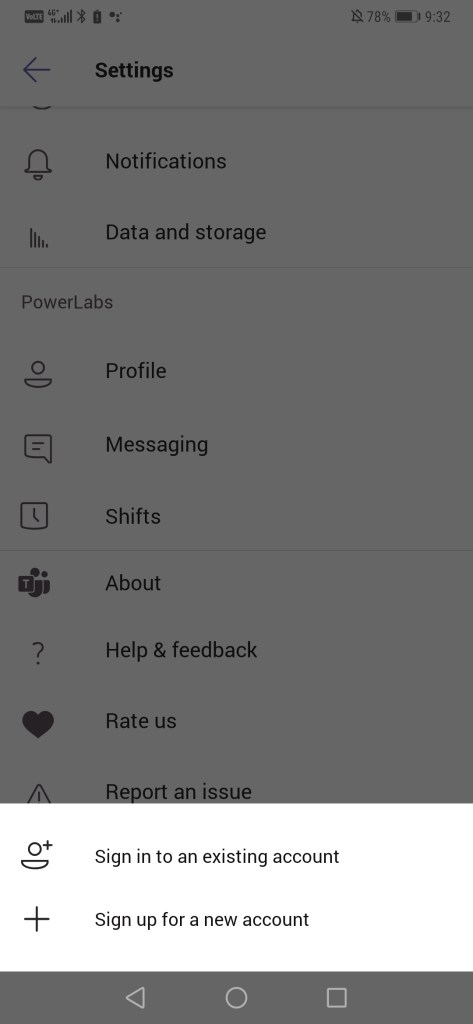
    Step 2. Sign in or Sign up to your 2nd, 3rd or… Teams account.

    Screenshot_20190906_093217_com.microsoft.teams

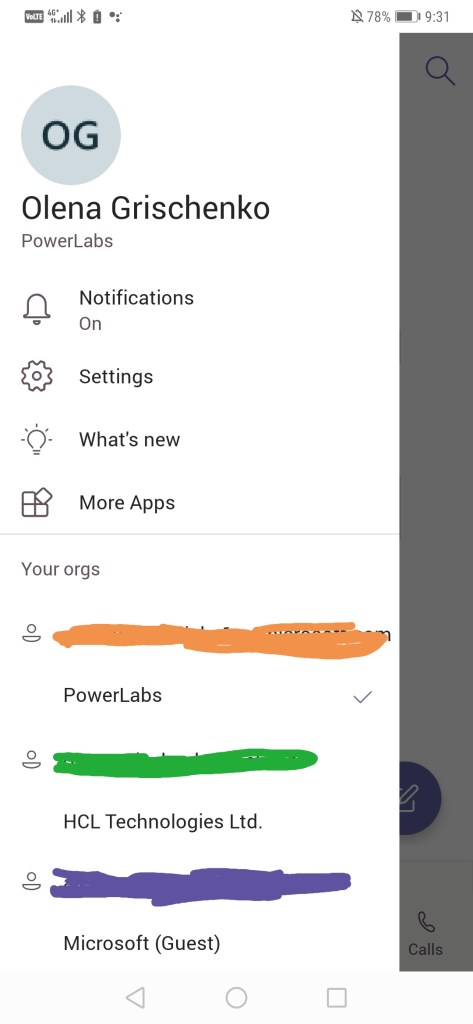
    Step 3. All my 3 Teams accounts are here.

    Screenshot_20190907_054456

    Unfortunately, we have to switch in between accounts to work with the particular Team but Microsoft guys are working on the multiteams feature.

    I tried to find the information regarding max number of accounts you can add to the app and found nothing, unfortunately. Will keep searching.


  • Fixing the ribbon button issue for a new Dynamics 365 UI

    The issue

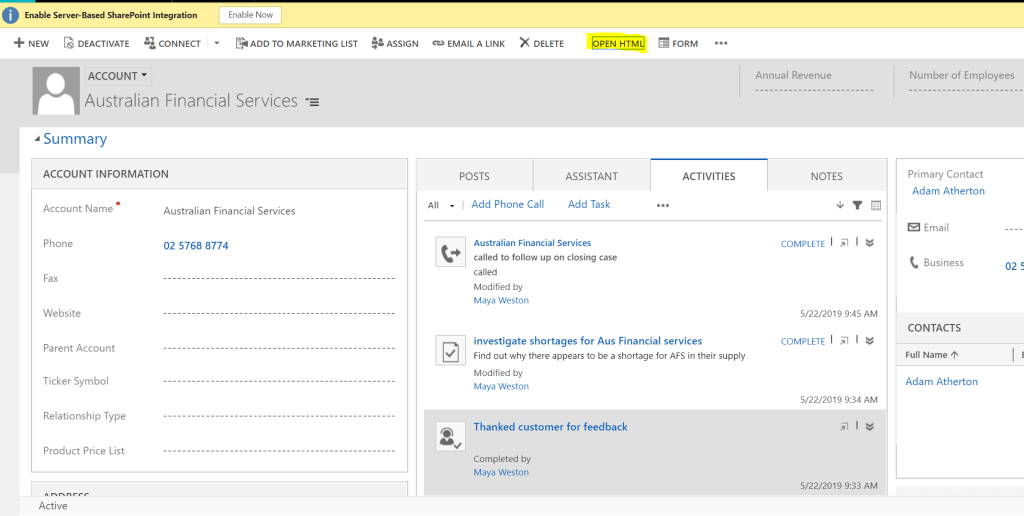
    After changing to a new UI a custom web resource launched from a custom button of the ribbon bar stopped receiving parameters.

    This leads to the incorrect page layout generation and other issues which are based on the missing parameter.

    The diagnostics

    There are things to consider while performing re-work on the page:

    • The Command selected to launch the web resource is not the best solution according to the best practice. We will replace the URL command with JavaScript .
    • The latest CRM forms scripting framework changes have to be accommodated
    • The way to pass parameters from the parent form to the web resource should be the working scenario for both UIs, old and new.

    POC

    This is how it’s gonna work after we implement the proof of concept:

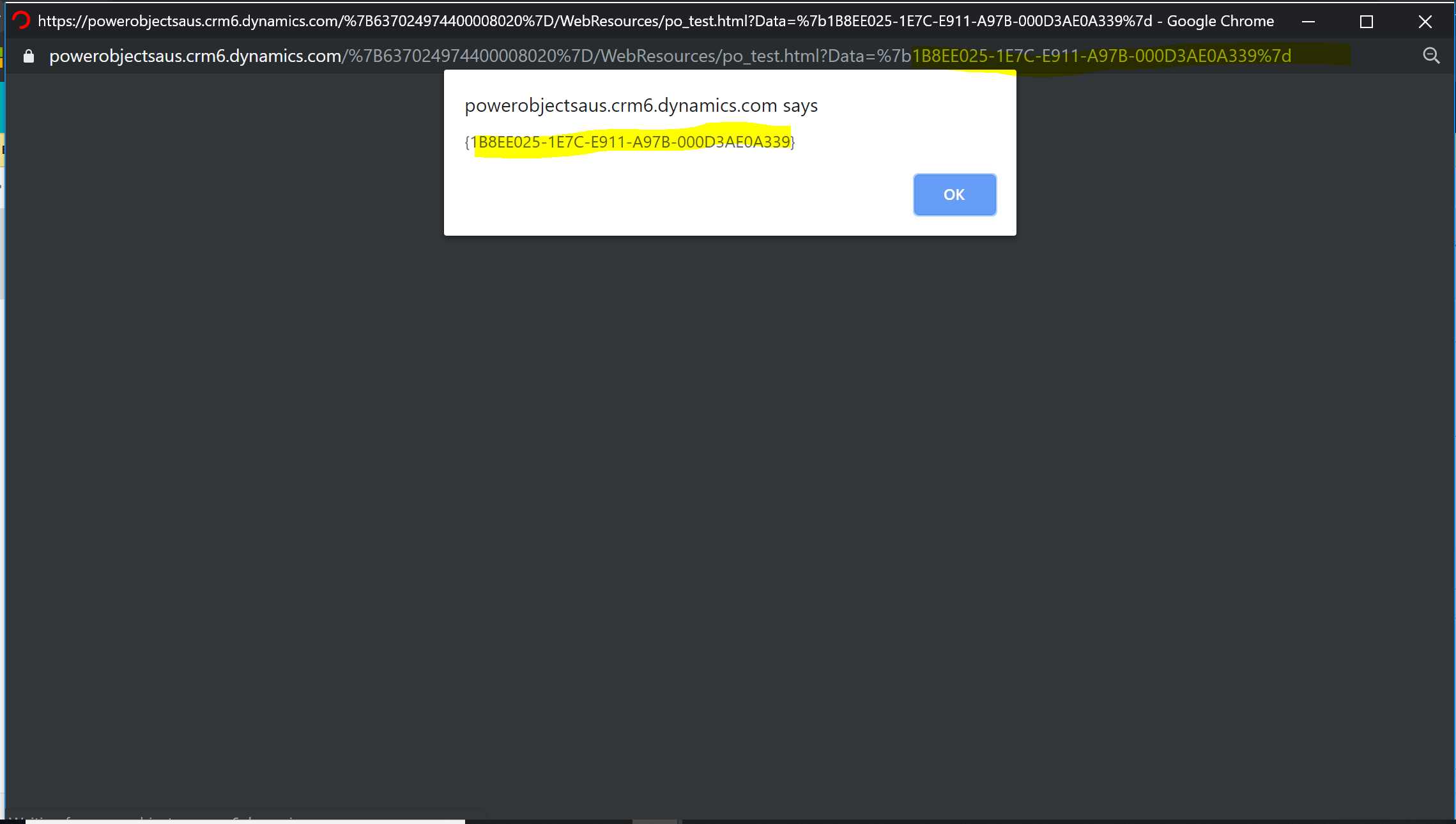
    Old UI

    pic1

    Pay attention to the query string. “Data” parameter contains entityId.

    pic2

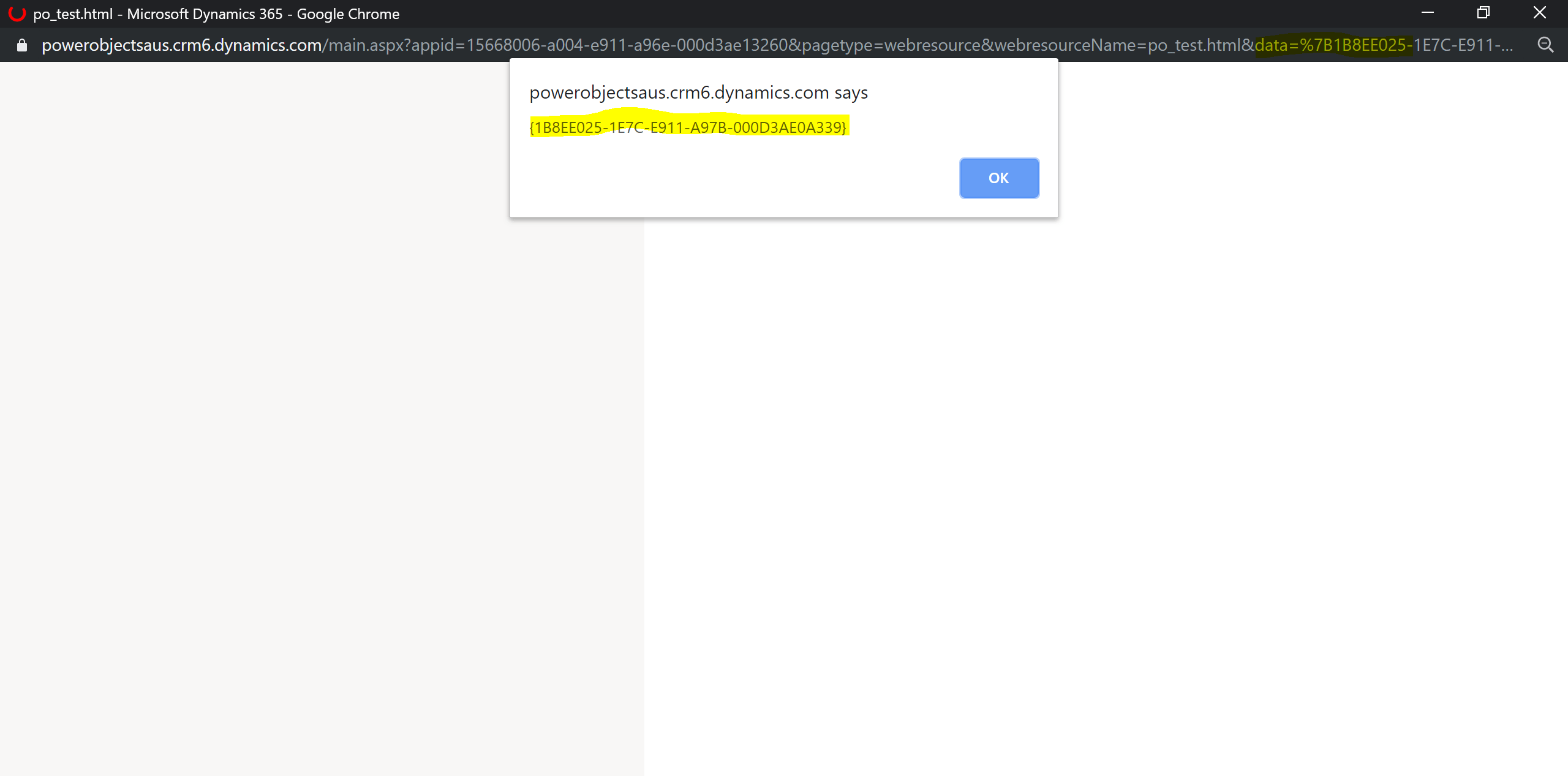
    New UI

    pic3

    And here for the query string “data” parameter contains entityId.

    pic4

    The solution

    1)Create a JavaScript library with a function as per the screen below:

    pic5

    var PO = window.PO || {};
    PO.openHTML = function (primaryControl, commonProperties) {
        var formContext =primaryControl;
        if(formContext == null) return;
        var id = formContext.data.entity.getId();
        Xrm.Navigation.openWebResource("po_test.html",null, id);
    };

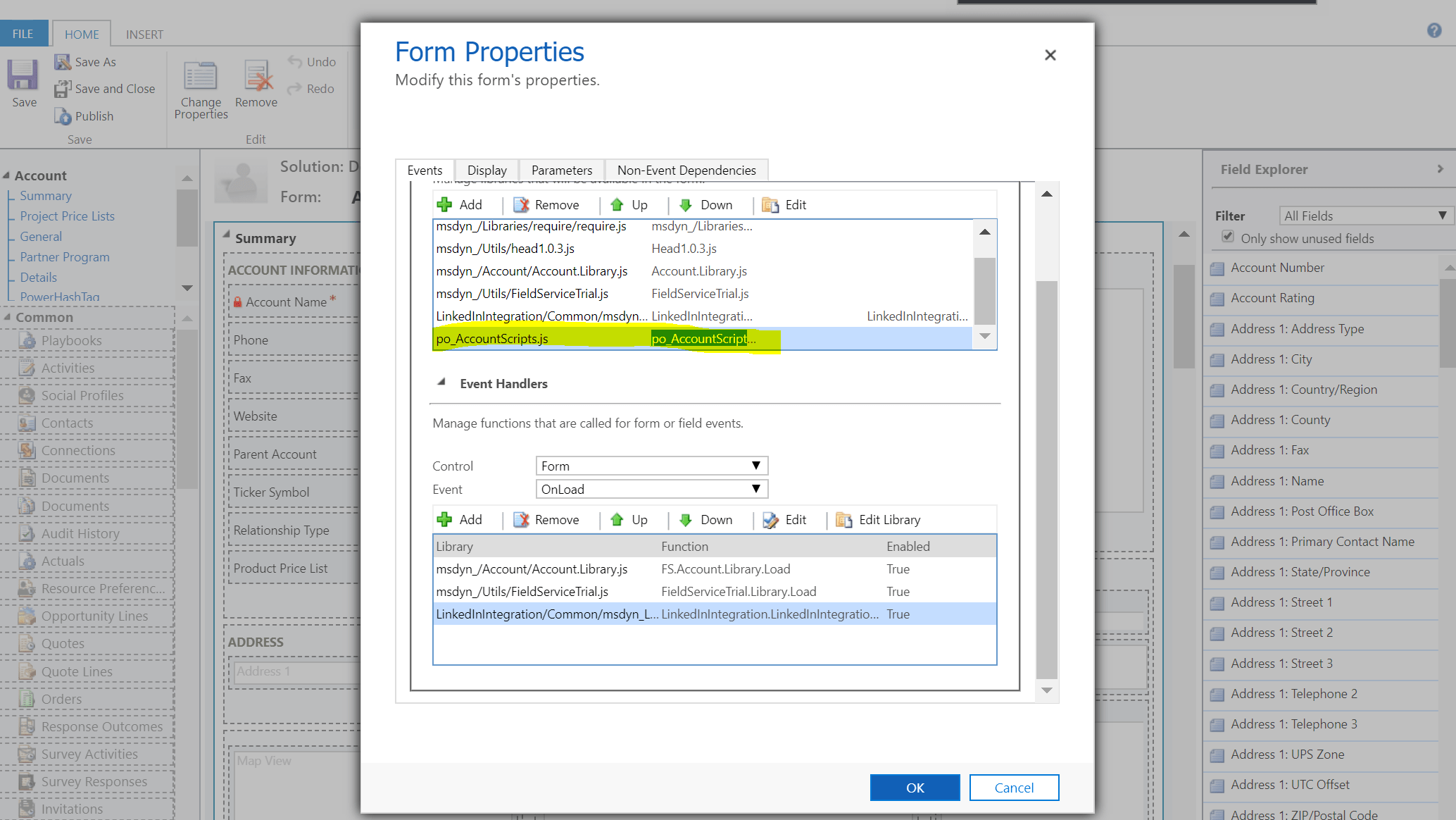
    2)Add the library to the Account form:

    pic6

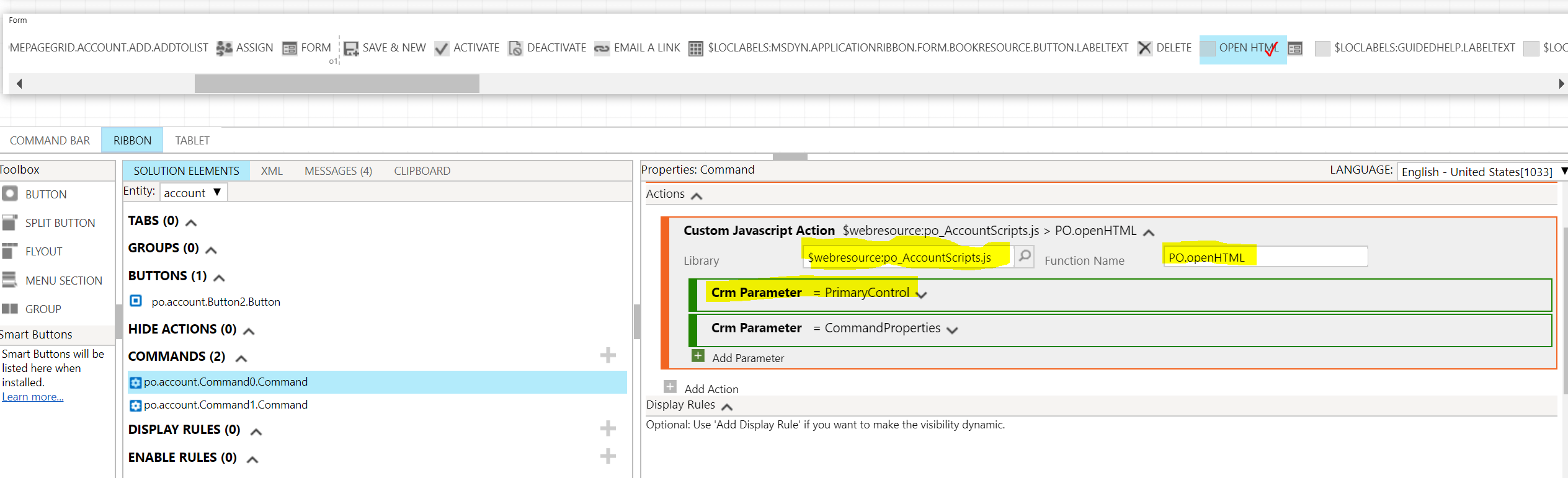
    3)For the Account entity form ribbon using RibbonWorkbench change the Command type on Ribbon bar button to JavaScript. Add the library and the function references from the steps above. Add a CRM Parameter = PrimaryControl.

    pic7

    3)My test HTML code. The bit to highlight here is the parameter storing a record Id for old UI is “Data” and for new one “data”. We use .toLowerCase() function to manage this fact.

    <html>
    <head>
        <meta charset="utf-8">
        <meta http-equiv="X-UA-Compatible" content="IE=Edge">
        http://../ClientGlobalContext.js.aspx
        http://scripts/es6promise.js
        http://scripts/WebAPIFunctionsAndActions.js
        
        function getQueryVariable(variable) {
                var query = window.location.search.substring(1);
                var vars = query.split('&');
    
                for (var i = 0; i decodeURIComponent(pair[0]).toLowerCase() == variable.toLowerCase()) {
                        return decodeURIComponent(pair[1]);
                    }
                }
                alert('Query variable %s not found', variable);
            }
            alert(getQueryVariable("data"));
    </head>
    <body lang="en-US" style="overflow-wrap: break-word;">
        <h1>Test</h1>
    </body>
    </html>