As a Power Platform admin, I would like to automate the environment creation at the same time, making sure the environment created could be used to install Dynamics 365 apps in the future.
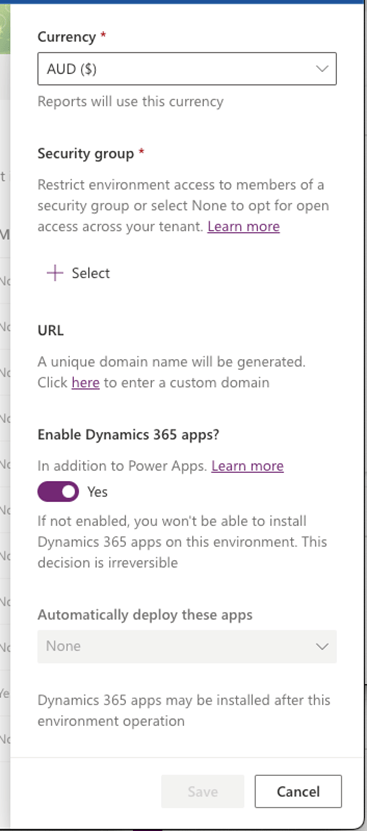
Select Yes and make a selection to automatically deploy apps such as Dynamics 365 Sales or Dynamics 365 Supply Chain Management. You must have an appropriate Dynamics 365 license to select Yes. If you don’t select Yes at the time of database provisioning, you won’t be able to make this change later nor be able to install Dynamics 365 apps on this environment.
Enable Dynamics 365 apps
As you can see in the description here if apps are not enabled for the environment you will not be able to install them in the future. It means a headache with the data migration and extra complexity for the project with the cost implication for a customer.
Via the UI we enable the apps as shown below:
When we create a database automatically using the Create CDS Database action of the Power Platform for Admins connector it doesn’t enable Dynamics 365 apps by default.
So how do we do it?
We need to specify the template parameter: D365_DeveloperEdition for the action Create CDS Database.
It would be much easier if it’s documented properly.
As a Power Platform admin I want to remediate the Default environment to deploy a DLP policy so I could get to the Power Platform maturity level 200 for the Admin and Governance.
Olena
We notified users with non-compliant assets to back up or move their apps and automation, as they are going to break during the remediation. Some of the users got back to me, and we had some happy and unhappy conversations. One case stood out, so I decided to share it with you.
A user contacted us to ask if we could help him to back up assets. His assets appear in our reports as they use a Dataverse connection. I was curious about what Dataverse is being used for. After the screenshare, we discovered that the data source in the automation is SharePoint and the data target is Excel Online, both compliant and classified as Business connectors. Where does the Dataverse connector come from?
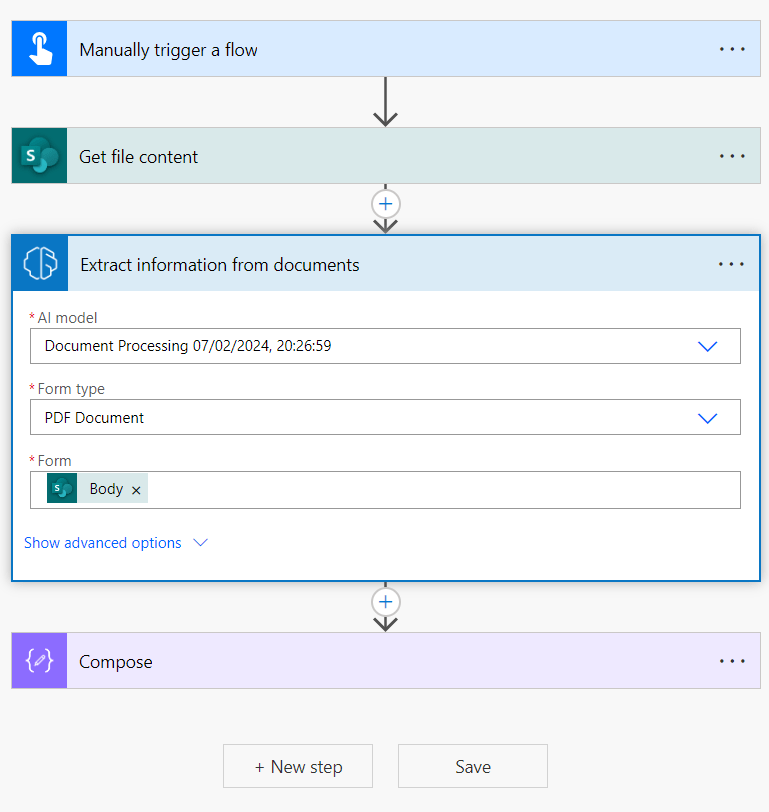
In the 3-step automation, the step in the middle was an action Extract information from documents using the Document Processing AI model.
Usually, I don’t work with AI builders. I prefer to use a custom connector with an Azure-hosted AI model instead for better value and flexibility.
Microsoft docs
AI Builder requires the use of Microsoft Dataverse, which is the data platform for Microsoft Power Platform that allows you to store and manage business data. Dataverse is the platform on which Dynamics 365 apps are built. This means if you’re a Dynamics 365 customer, your data is already in Dataverse.
Therefore, using the AI Builder action in Power Automate equals using the Dataverse connector indirectly.
Will it break?
We are deploying a DLP policy tier 0 where Dataverse is classified as a Non-Business connector. In the automation described above all actions except for the AI Builder one belong to Business connectors. It will break.
However, the Dataverse connector usage is indirect so there is a 0.5% chance it survives the remediation.
POC
If I am not sure how it works I create POC.
For this one I had to create an environment first, then a DLP policy with the required setup then a custom model and train it then create an automation. Lots of moving parts but I was too curious to think it through.
So the steps are:
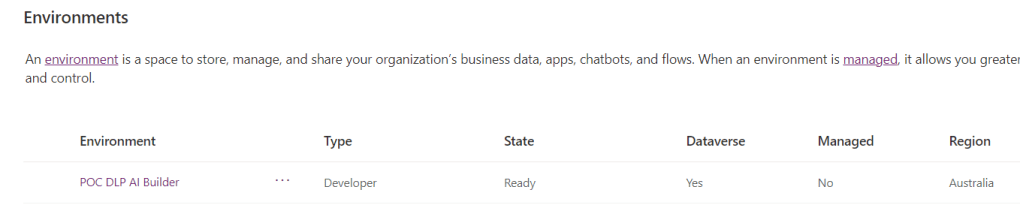
Create an environment first as we don’t want to break anything existing.
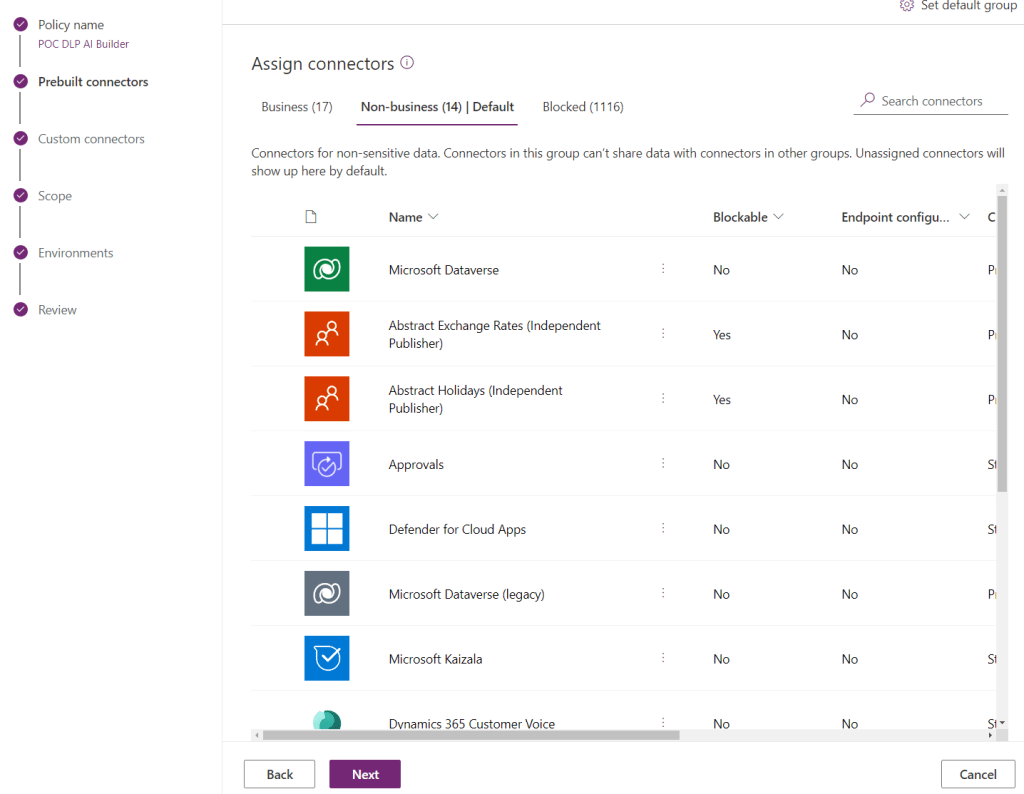
Create DLP policy but keep a Dataverse connector as Business for now.
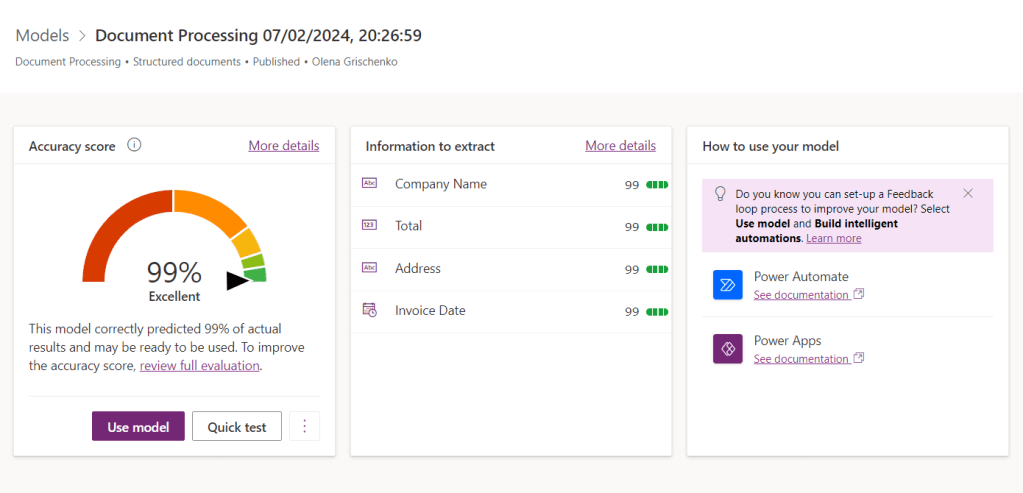
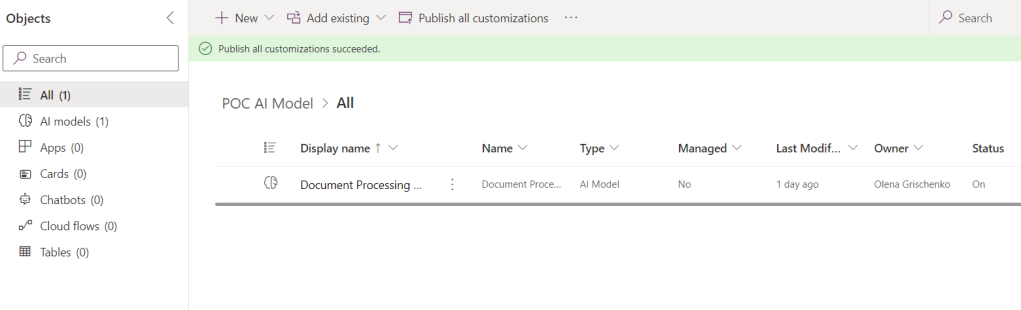
On the environment create a custom Document Processing model.
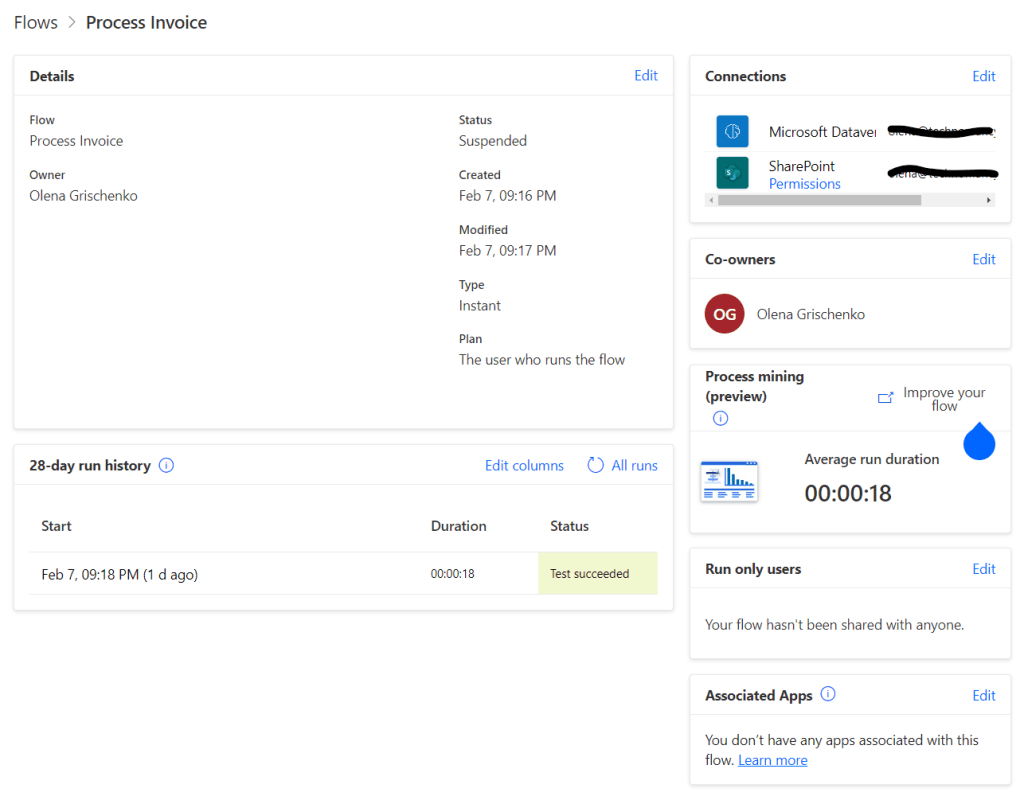
Create an automation using the model. Note it shows the Microsoft Dataverse connector in the list of connections for AI Builder. Also, notice the successful run and the status of the job.
After the job testing let’s modify the policy moving the Dataverse connector to Non-business.
It breaks!
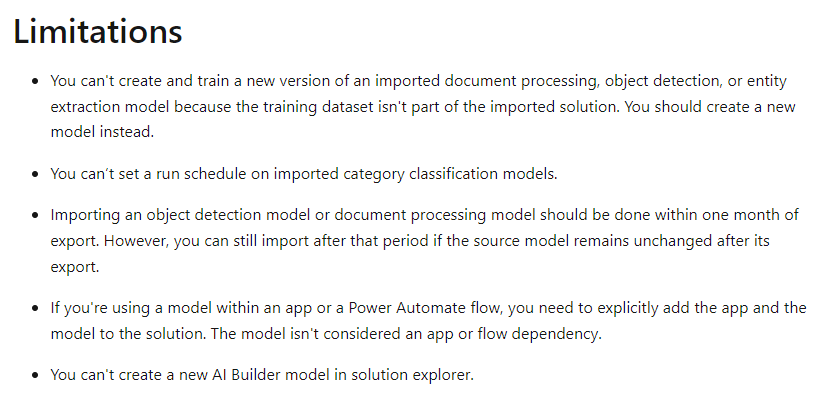
Solution – no solution
We suggested the user back up his jobs and models as the DLP policy deployment is going to impact the non-compliant assets.
I was modifying my custom environment creation automation today. For the security group creation action, I needed to add a System Admin to the security group owners to simplify a user management. The action takes the array like below:
First, I tried appending a System Admin value to the Owners array without making any checks. However, I was getting a Bad Request error suggesting that all item in the array must be unique:
“Object ‘[ResourceType=User,Id=xxxxxx-ae82-4d3e-8520-081231b0edc0,ChangedProperties=[],NonDefaultProperties=[INTERNAL_SingleResourceQuery]]’ referenced from ‘[ResourceType=Group,Id=77e2aab4-1b37-44ed-b4a7-85fd4ead461c,ChangedProperties=[DisplayName,Description,SecurityEnabled,MailEnabled,MailNickname,CreatedByAppId],NonDefaultProperties=[INTERNAL_EnableF14M1SchemaEnumTypes]]’ can only be present once as an add/remove change.”
I need a condition checking if user ID is already present in the array.
My rules
I don’t like too generic solutions.
I need to check for the array with max 3 items.
I only have strings in my array.
I need a partial matching for a user ID, if array item contains user ID substring.
I try use all tools available to me to solve the problem.
Wrong assumption
I started with the wrong assumption that I know what I am doing 🤞😎😎
I picked up the contains() function.
Spoiler: it worked at the end, but there are easier ways to achieve the same result.
Olena
Power Automate contains() function takes array or string as a first parameter. However, it works differently in each case.
For the string it will search for a second parameter as a substring. For example, if it searches in the string “I like bananas” for “nana“ it will return true.
contains("I like banana", "nana") = true
For the array, it will search for the exact match for the item. For example, for fruits [ apple”, “pear”, “banana”] the contains(fruits, “nana”) returns false.
It may be fair but still confusing.
I wrongly assumed it will search for a substring, not for the exact string match for the array item. As soon as I realized my mistake, the issue was resolved.
Look!
Test run.
My solution
Let’s convert the array to string (as it is anyways)!
Test run.
It’s working!
Copilot (Bing chat)
The co-pilot was very helpful. When I already knew the answer. When I asked it explicitly “can I search for the partial match in array” it told me “Wait, NO!” While I was wondering around it wasn’t very helpful as by looking at the definition it wasn’t easy to figure out it works differently with different data types.
I tested another function indexOf.
Unfortunately, the co-pilot suggestion for using indexOf with array was totally misleading. When I tested it gave me an error.
Look!
Test run.
Converting array to string first, obviously, fixes the error.
Power Automate Copilot
“How do I search for partial match in array?”
“For the array on the step “…” I want to know if it contains a certain string”
It doesn’t fail, but the expression is wrong so it doesn’t work either.
Not helpful!
Google
The biggest “wrong” thing about any search I used not just Google – NO MICROSOFT DOCS REFERENCES. I don’t want your awesome YouTubers or community blogs! I want Microsoft learn article first. Please.
Google is still the best way to search.
The second from the top article gives you all sort of right answers:
The main issue with teaching people to create a ‘correct’ prompt is that people don’t know what they don’t know. When I know how to ask the correct question, then my problem is almost solved. There are stages before when we are forming a dictionary, finding out how to name things correctly for the area with which we are not familiar.
Co-pilot is more helpful than Power Automate co-pilot. Neither solved the problem though.
Google is still the best way to search for answers.
It helps when Microsoft documentation links in the search results appear before all popular videos and community blogs.
In my world being an expert in something and being a dummy in something else is pretty normal. No one knows everything. I am an expert in the Power Platform and Business Applications, but even that area is too big for me, so I continue learning every day.
When I tried to deploy the Power Platform communication site template for my organisation, I encountered multiple issues. They look like silly issues to me now and I am sure 99.9% of you would never struggle with something like this. But I did.
First, I am not a PowerShell expert. Over the past year, I have learned that being a good developer doesn’t necessarily make you a good administrator. So it’s okay; I’ll keep learning.
Second, being a Power Platform expert doesn’t automatically make you an Office 365 expert. The SharePoint world has changed since I was a SharePoint developer, so there are things to learn here as well.
Third, I always remember that if I struggle with ‘stupid things,’ someone else in the world is likely experiencing the same issues. So I am happy to share my learning with you. Perhaps it will save you some time.
Create an internal Microsoft Power Platform hub
At the heart of growth is a community, a place for people to collaborate, share ideas, and discover new ways to apply technology to achieve more. A community is a safe place to ask questions to share tacit knowledge and expand skill sets. Organizations that have succeeded at creating a growing community of makers provide tools such as Yammer or Microsoft Teams groups, regular events and speaking opportunities, and foster an environment of ongoing learning.
They make sure that every person in the organization can come together at regular intervals to socialize, share their knowledge, and explore new possibilities. Leaders who want to create a digital culture will put a framework in place for the community inside their organization to break down geographic and organizational silos.
…
Set up your own SharePoint Hub or Teams site to share success stories, upcoming events, rules of engagement, and guidelines with your maker community – or get started with the Power Platform Hub template. This site should be a one-stop shop for makers to find out everything they need to get started with Microsoft Power Platform.
Microsoft Learn
Get started with the Power Platform communication site template
We start with Microsoft Learn, here you will find very good step-by-step instructions:
Good enough for someone who’s not me 😎 Therefore, issue number 1.
Issue 1. The incorrect version of PowerShell running on your machine.
When you download a zip file from here: https://aka.ms/pphub-download and extract it, you will see the template file and two PowerShell script files inside.
We need to download and install PnP PowerShell to run the Deploy-PowerPlatfromHub script and Microsoft.PowerApps.Administration.PowerShell to run PowerPlatformHubAsDLPErrorSettings script.
In the documentation, we find the following statement:
The PowerShell commands in the Microsoft.PowerApps.Administration.PowerShell module requires Windows PowerShell version 5.x.
Microsoft Learn
It’s somehow misleading as it only mentions the PowerShell version requirements for Microsoft.PowerApps.Administration.PowerShell module. It says nothing about PnP PowerShell.
What’s PnpPowerShell?!
PnP PowerShell is a .NET Core 3.1 / .NET Framework 4.6.1 based PowerShell Module providing over 600 cmdlets that work with Microsoft 365 environments such as SharePoint Online, Microsoft Teams, Microsoft Project, Security & Compliance, Microsoft Entra ID, and more.
For more information about installing or upgrading to this module, refer to these PnP PowerShell articles.
Microsoft Learn
Is PowerShell version 5.x. mentioned in the article good enough? Let’s see!
From the PnP PowerShell website, not the original article!
You need PowerShell 7.2 or later to use PnP PowerShell. It is available for Windows, Linux and Mac and can be installed through here.
If you run the script and everything worked the first time, don’t read any further. This article is for people like me, people who ran the script and it failed.
My Deploy-PowerPlatfromHub script failed the first, the second, and third time. To debug I decided to load the script to VSCode which makes it easy to debug.
The Script
The script is pretty straightforward. When you know 😁
There is some code but most of it is just an error handling and some checks.
All it does is create a SharePoint site and then import the template.
This is the bit you have to get right. It looks pretty straightforward yet I made a mistake.
The “PowerShell script is not digitally signed” message is the outcome of one of Microsoft’s already built-in security features. The protection is based on the script execution policies regulating which scripts are allowed to run on your computer.
I tried different things as suggested here and in other blog posts.
What helped me personally is the following:
Untick the Unblock tickbox on the General tab of the script file Properties then click OK.
Issue 3. The SharePoint site hasn’t been provisioned correctly
Remember I told you I got my parameters wrong? It’s time to explain what happened.
When I ran the script, still the first one, it created a site. Unfortunately, the site hasn’t been provisioned correctly. I didn’t know about it as I didn’t get any errors about the issue.
Which is pretty unusual counting everything I described above 😁
When I clicked on the site link, it displayed an error.
In the script part below replace template.pnp with whatever you like either a relative path if you are a very smart person or an absolute path if you are like me.
Finally! The first script was successfully executed and the second one only had one error which is ‘PowerShell Script Is Not Digitally Signed’ and was easy to fix.
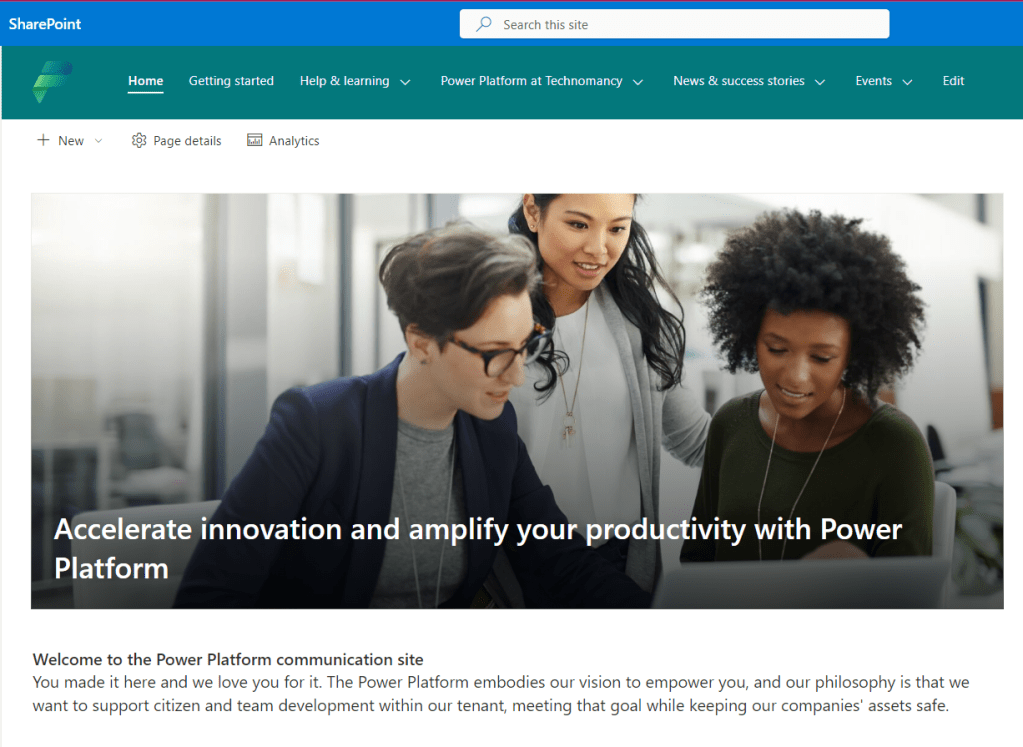
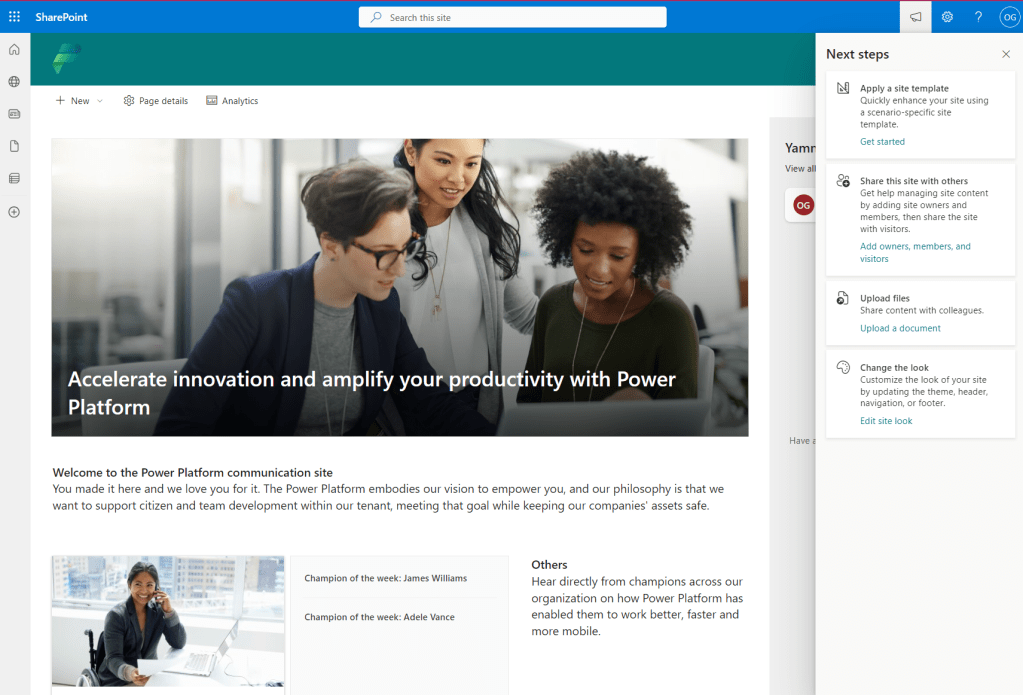
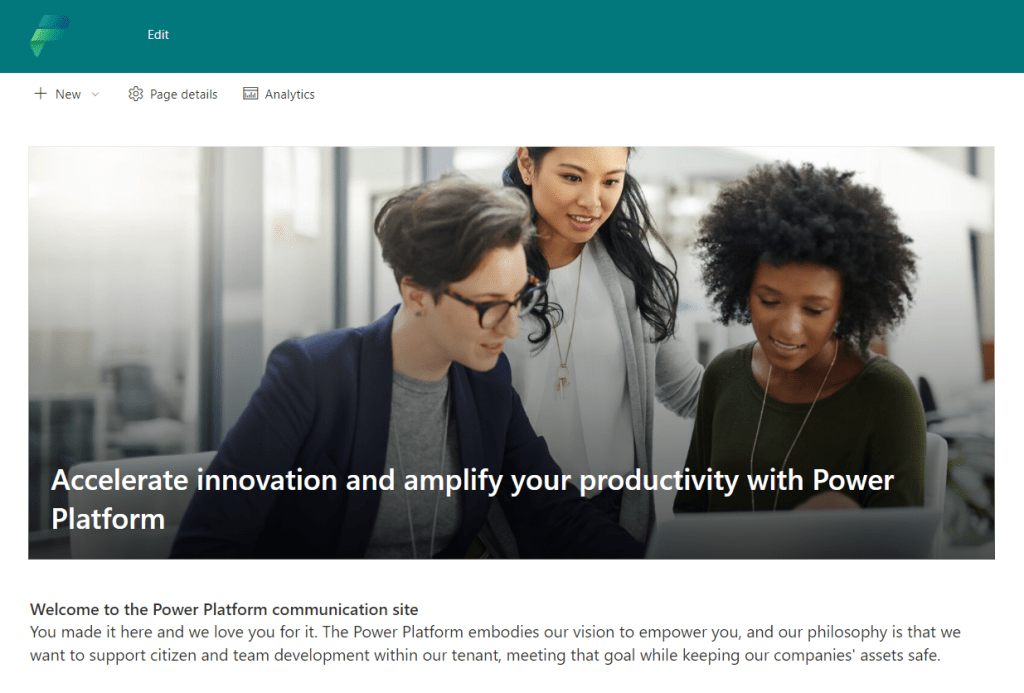
The result is below. Looks A-M-A-Z-I-N-G!
Wait a second! Where is my navigation?!
Issue 6. The site doesn’t have a navigation
Well… last time we installed it at a client it somehow fixed itself the next day 🤔
This time I didn’t want to wait for the miracle to happen.
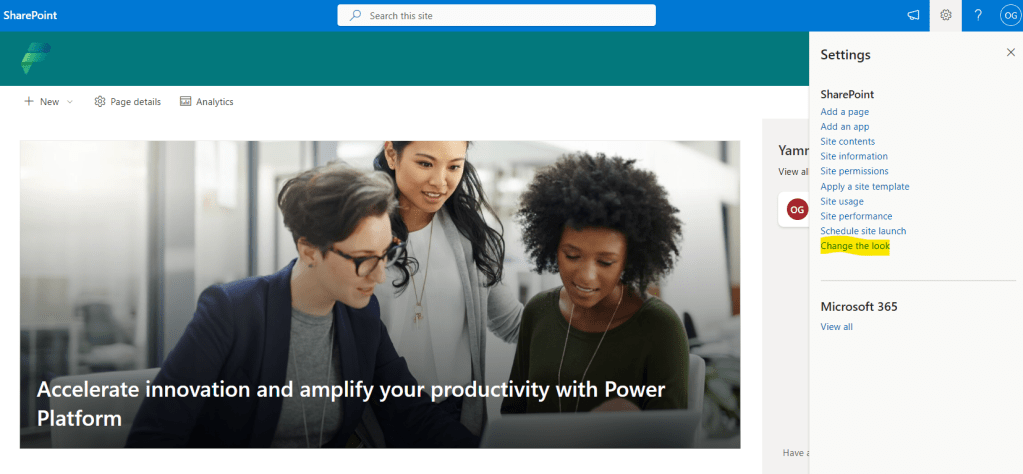
From the top menu Settings -> Change the look
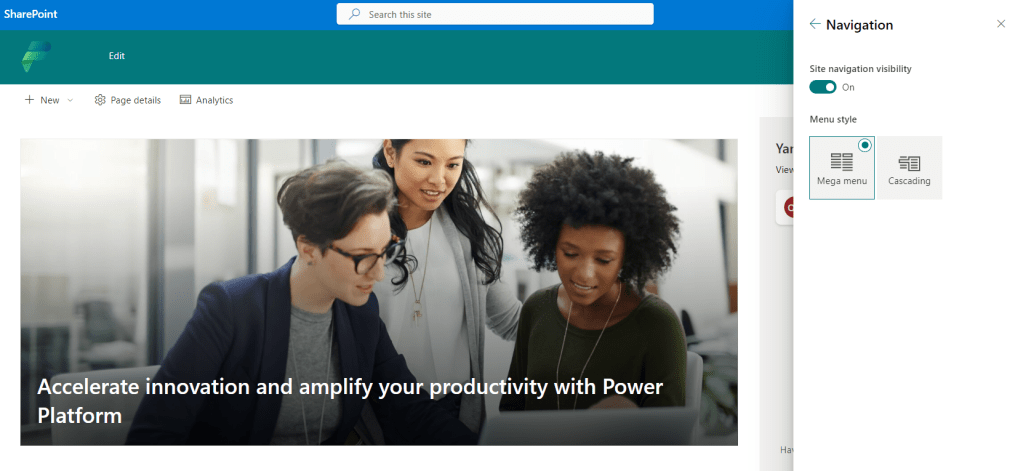
Click on the Navigation.
Site navigation visibility toggled on. Save.
From the top banner click on Edit.
Enable site navigation audience targetting toggle on. Save.
Ta-a-da-a!
The template is great! it has the foundation of everything you need to communicate with makers. I want you to love it as much as I do. Therefore if you experience any issues with the deployment of the hub let me know and I will try to help.
















 Olena's Dynamics Blog (post-AI)