I’ve been working with portal for so many years that every time something like this is happening I feel like dying of emberrasement.
For my demo entity list, I couldn’t get the Edit button to appear and I knew, I knew it was about Entity permissions. You need to make sure you set up your permissions correctly and add these permissions to your user role. And clear cache.
This is the article explaining Entity permissions for the portal:
Which made me feel even more frustrated. I know it’s about permissions but I checked everything already!
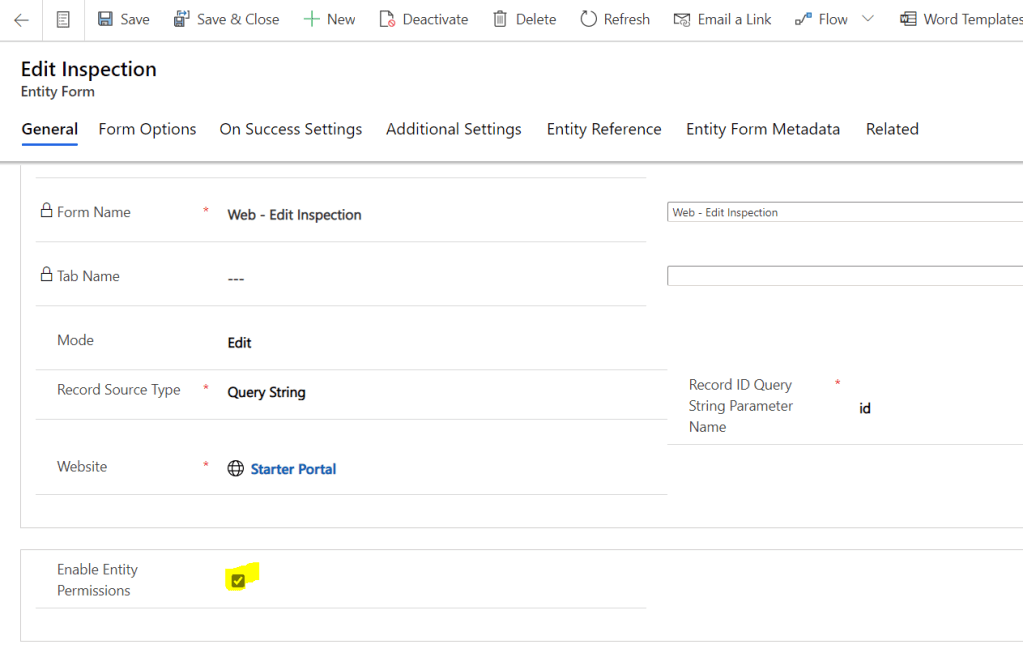
On a Edit form:
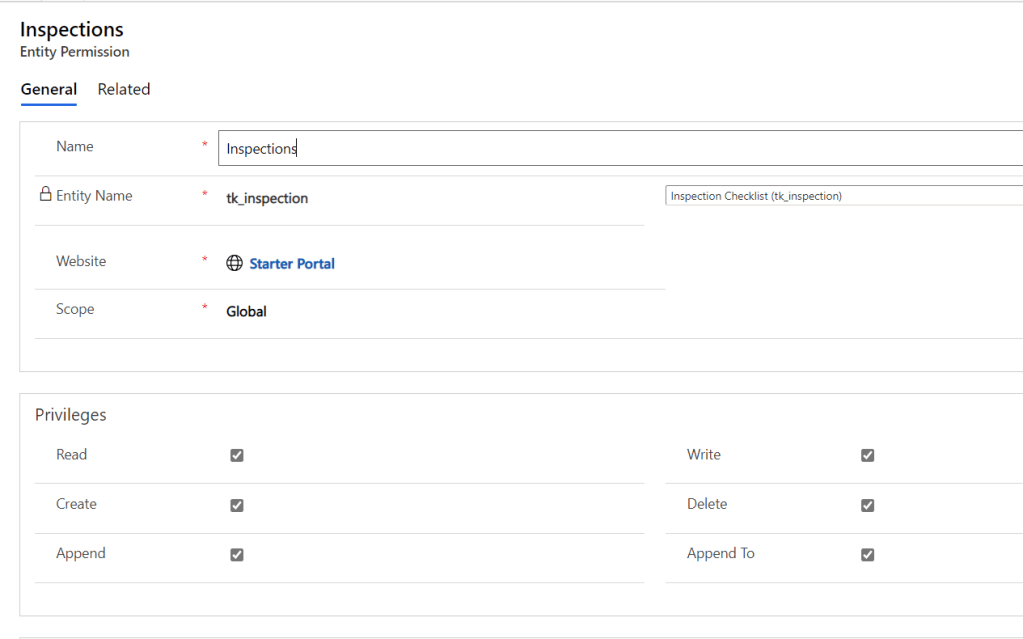
The actual permission:
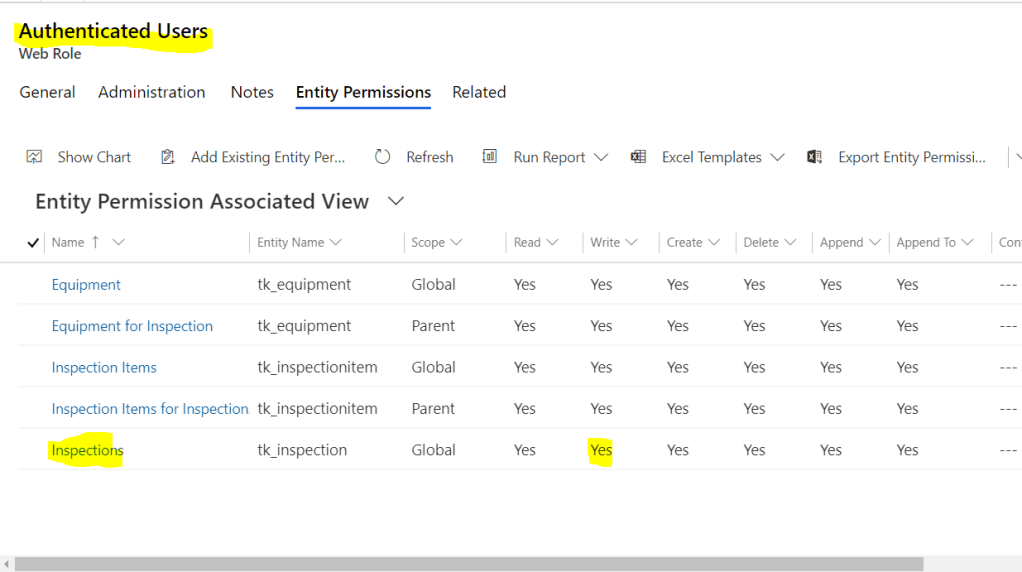
The security role:
What did I miss?! THIS!
Crazy! But how?
The Enable Permissions checkbox for the Entity form is located the way it’s easy to notice it.
For the Entity list, it’s deep down to the bottom of the screen and you scroll through Views and stuff. It got lost there and I missed it. I only noticed it because it was displayed in the grig for Active Entity Lists. It was set to No and I knew it was the reason I couldn’t get things working.
So, just remember: if Edit button doesn’t appear for your entity list, it’s always about Entity permissions. You just have to find the right checkbox 🙂
var uriClientLegacy = "?$select = cca_legacyservicefee, defaultpricelevelid & $filter=accountid eq " + clientLookupId;

Xrm.WebApi.retrieveMultipleRecords("account", uriClientLegacy).then( function success(result) {
...
},
function (error) {
console.log(error.message);
// handle error conditions
alert(error.message);
});
And this is the execution result:
{"error":{"code":"0x0","message":"The query parameter $select is not supported","innererror":{"message":"The query parameter $select is not supported","type":"Microsoft.Crm.CrmHttpException","stacktrace":" at Microsoft.Crm.Extensibility.OData.QueryOptionsConverterBase`4.ThrowIfInvalidQueryOptionsExists(CrmODataExecutionContext context, String edmEntityName)\r\n at Microsoft.Crm.Extensibility.OData.QueryOptionsConverterBase`4.GetQueryExpression(ODataQueryOptions queryOptions, String edmEntityName, CrmODataExecutionContext context, XrmMetadataEntityMetadata metadata)\r\n at Microsoft.Crm.Extensibility.OData.CrmODataServiceDataProvider.RetrieveEdmEntityCollection(CrmODataExecutionContext context, String entityCollectionName, String castedEntityName, ODataQueryOptions queryOptions)\r\n at Microsoft.Crm.Extensibility.OData.EntityController.GetEntitySetInternal(String entitySetName, String castedEntityName, CrmODataExecutionContext context, CrmEdmEntityObjectCollection crmEdmEntityObjectCollection, ODataQueryOptions queryOptions)\r\n at Microsoft.Crm.Extensibility.OData.EntityController.GetEntitySetImplementation(String entitySetName)\r\n at Microsoft.Crm.Extensibility.OData.CrmODataUtilities.<>c__DisplayClass11_0`2.<InvokeActionAndLogMetric>b__0()\r\n at Microsoft.PowerApps.CoreFramework.ActivityLoggerExtensions.Execute[TResult](ILogger logger, EventId eventId, ActivityType activityType, Func`1 func, IEnumerable`1 additionalCustomProperties)\r\n at Microsoft.Xrm.Telemetry.XrmTelemetryExtensions.Execute[TResult](ILogger logger, XrmTelemetryActivityType activityType, Func`1 func)\r\n at lambda_method(Closure , Object , Object[] )\r\n at System.Web.Http.Controllers.ReflectedHttpActionDescriptor.ActionExecutor.<>c__DisplayClass10.<GetExecutor>b__9(Object instance, Object[] methodParameters)\r\n at System.Web.Http.Controllers.ReflectedHttpActionDescriptor.ExecuteAsync(HttpControllerContext controllerContext, IDictionary`2 arguments, CancellationToken cancellationToken)\r\n--- End of stack trace from previous location where exception was thrown ---\r\n at System.Runtime.ExceptionServices.ExceptionDispatchInfo.Throw()\r\n at System.Runtime.CompilerServices.TaskAwaiter.HandleNonSuccessAndDebuggerNotification(Task task)\r\n at System.Web.Http.Controllers.ApiControllerActionInvoker.<InvokeActionAsyncCore>d__0.MoveNext()\r\n--- End of stack trace from previous location where exception was thrown ---\r\n at System.Runtime.ExceptionServices.ExceptionDispatchInfo.Throw()\r\n at System.Runtime.CompilerServices.TaskAwaiter.HandleNonSuccessAndDebuggerNotification(Task task)\r\n at System.Web.Http.Controllers.ActionFilterResult.<ExecuteAsync>d__2.MoveNext()\r\n--- End of stack trace from previous location where exception was thrown ---\r\n at System.Runtime.ExceptionServices.ExceptionDispatchInfo.Throw()\r\n at System.Runtime.CompilerServices.TaskAwaiter.HandleNonSuccessAndDebuggerNotification(Task task)\r\n at System.Web.Http.Dispatcher.HttpControllerDispatcher.<SendAsync>d__1.MoveNext()"}}}
And this is the correct answer:
var uriClientLegacy = "?$select=cca_legacyservicefee,defaultpricelevelid&$filter=accountid eq " + clientLookupId; //NO WHITE SPACES!ONLY 2 WHICH ARE REQUIRED

Xrm.WebApi.retrieveMultipleRecords("account", uriClientLegacy).then( function success(result) {
...
},
function (error) {
console.log(error.message);
// handle error conditions
alert(error.message);
});
The requirement is to summarize 4 number field values to determine if the total is greater than 0. What could possibly go wrong?
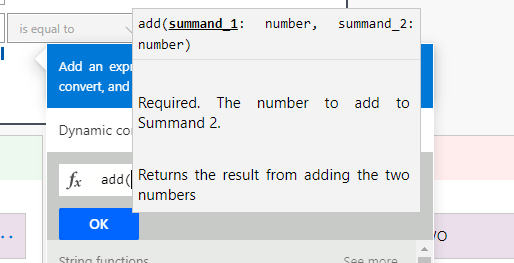
You think it should be somewhere in the Expression under Math functions. Think again.
The add only allows to summarise 2(!?) numbers. Not 3, not 4. It let me to add extra fields and passed the validation then it failed on a run.
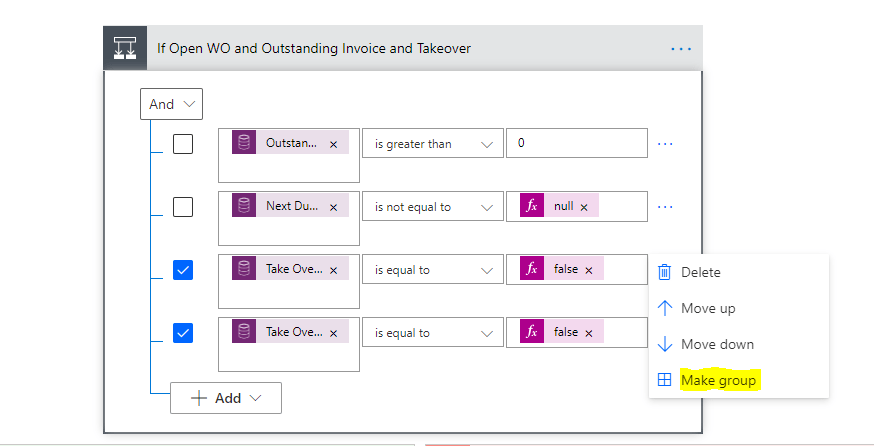
The solution is to use Increment Variable 3 times. We Initialize variable with one of the fields then add another 3 fields in the sequential Increment variable actions.
Easy!
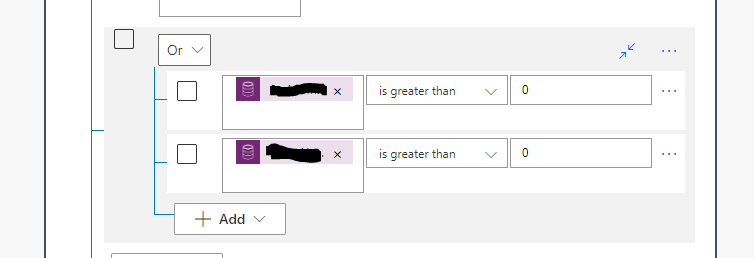
Actually, for this specific case when the actual sum is not important and the only thing we care about is the total is greater than 0 it’s enough to determine that at least one of the field values is greater than 0.
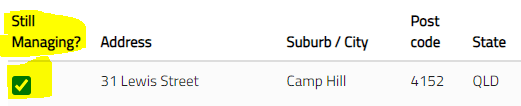
The real-life scenario: a portal user (agency) indicates that they don’t manage a particular property anymore. The action is performed via self-service portal. From a user experience perspective, the property has to “disappear” from the list of active properties immediately after “no manage” action is performed.
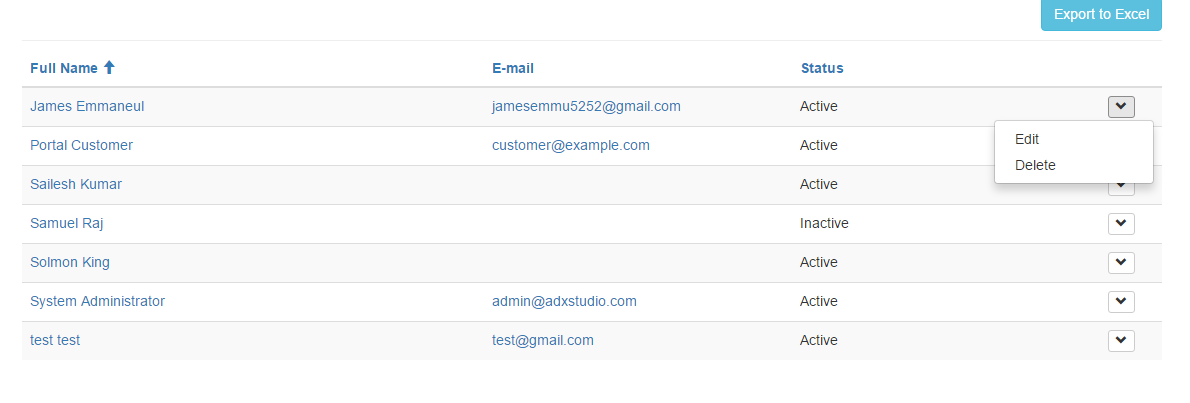
Again, from the user experience perspective, Items Actions aren’t very “visual” with the items are hiding in the context menu.
Item Actions on a portal
So we go custom.
On click of the checkbox we open a modal dialog confirming the additional details then we run workflow(you can always look up the page source code to see how it’s done) or perform deactivate.
BUT…
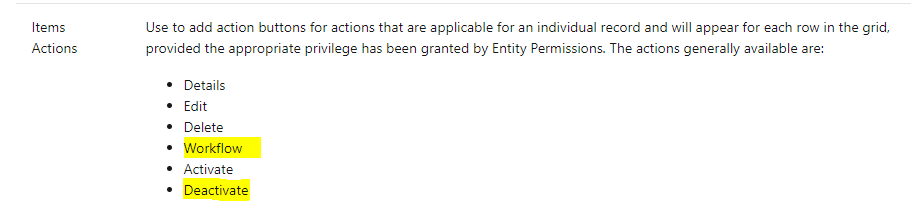
With the OOB Deactivate Item action you can’t choose a status reason.
You’ve got more flexibility with Workflow option. But what happens if you don’t want to use workflow?
Workflows are deprecated and has to be replaced at some point anyways. We try to develop new functionality with Power Automate.
So how do we do this?
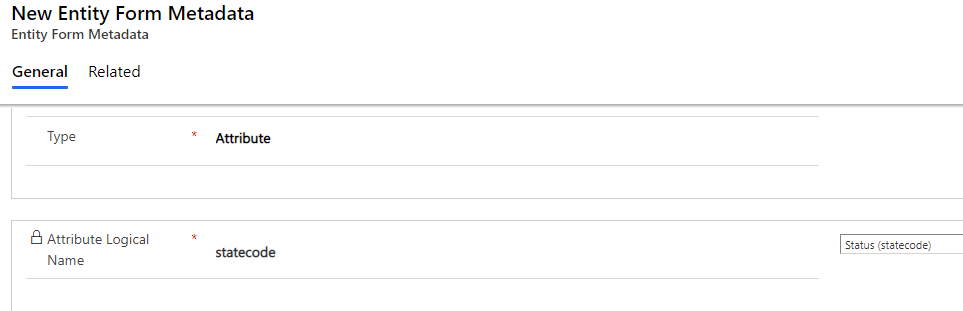
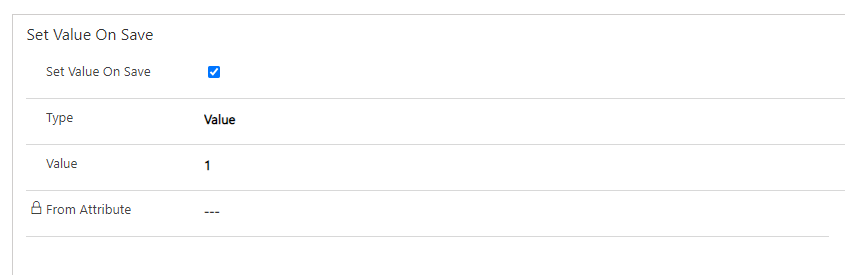
We can use a form metadata to deactivate record on save.
It’s not better than Deactivate but it’s arguably better than workflow.
I want my status reason to be set to a non-default value. I can’t do it in any “natural” way. Un-natural way is to set the correct status reason with Power Automate after setting it to default from the portal first. So you will set status reason twice.
Happy days? Not exactly.
We had the workflow running on a status reason change which performed a certain logic. The worst bit, it was running synchronously. Changing workflow to accommodate portal double-running logic was the wrongest possible way to solve the problem (not because it was already big enough to easily break if you touch it or because it had if…then…else… runs for all existing statuses and reasons in combinations…)
At the moment we discovered that record deactivation was working differently for CRM side and a portal side I started thinking of the way to set status on a portal but save the correct status reason once, not twice.
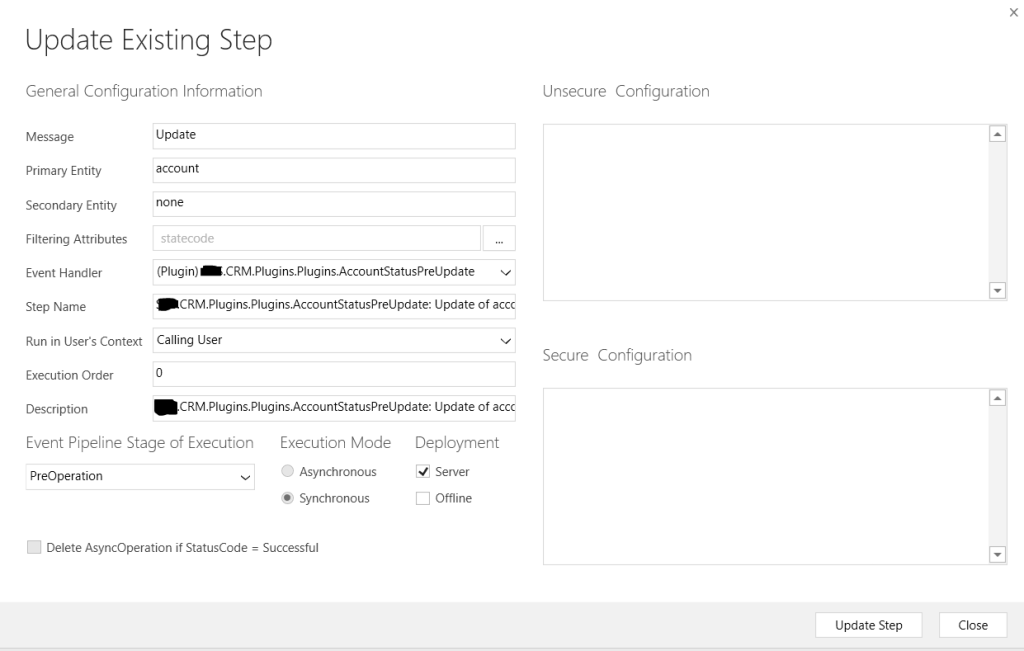
Something had to run before the synchronise workflow and change the reason to a correct one. This “something” is a PreOperation plugin running on pre-update synchronously.
Pre-update for Account. Execution Order 0.
There is a trick here: Execution Order has to be set to 0. This is to get it running before the sync workflow.
I don’t have the best memory and probably forget more than learn, because it’s more to forget due to changing every second technologies.
Summary: sometimes we need to override something before it saved to CRM. Sometimes we need a place to run some logic before sync workflow is triggered. Pre-operation plugin could be a better option than introducing a branched complex logic to workaround. No-code doesn’t always solve problems. Sometimes you need an old world and a new world co-exist and you have to use a bit of coding to get things working together.











 Olena's Dynamics Blog (post-AI)