Skip to content

Olena's Dynamics Blog (post-AI)

Writing as a human

  • Home
  • About
  • Contact
  • Videos
  • YanaLiz Blog

recent posts

  • !Importan! This blog is now an archive
  • How to send email receipt from Stripe in Power Pages payments
  • D365 user queue: control which emails are synced. Default to No email messages.
  • Integrate eSignature with Power Pages
  • Power Pages: Upload large files – work in progress

about

#womenintech #mvp #businessapplications #dynamics365 #dynamics365developer #powerplatform #solutionsarchitect #businessapplications #netdveloper #azuredeveloper #lovewhatido #supportwomenintech #blogger #diversity #microsoftdeveloper
  • Twitter
  • Facebook
  • Instagram
  • Field Service Installation: are we there yet?

    Field Service Installation: are we there yet?

    September 15, 2020

    When you clicked on the magic button which you found here how do you monitor the progress?

    In the Power Platform admin center go to Environments.

    In the list of environments click on the environment you are upgrading Field Service on: https://admin.powerplatform.microsoft.com/environments

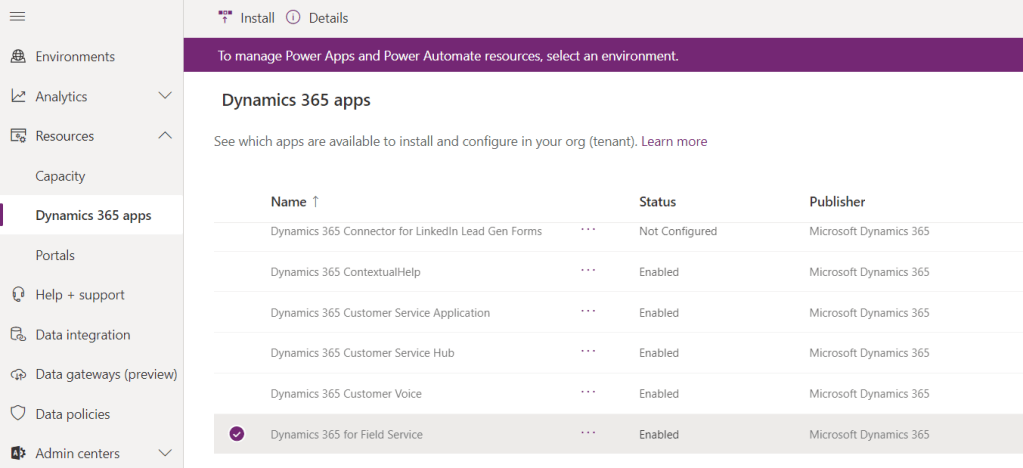
    From Resources click on Dynamics 365 apps …

    Enjoy the progress!

    Share this:

    • Share on LinkedIn (Opens in new window) LinkedIn
    • Email a link to a friend (Opens in new window) Email
    • Share on X (Opens in new window) X
    • Share on Facebook (Opens in new window) Facebook
    • Share on Telegram (Opens in new window) Telegram
    Like Loading…
  • Field Service upgrade: where is my button?! 🤔

    Field Service upgrade: where is my button?! 🤔

    September 14, 2020

    With the new Power Apps admin portal if you want to upgrade the Field Service solution you have to do the following:

    1. Go to Power Platform Admin center:

    https://admin.powerplatform.microsoft.com/

    2. From the left navigation Resources -> Dynamics 365 apps:

    3. Select Dynamics 365 Field Service.

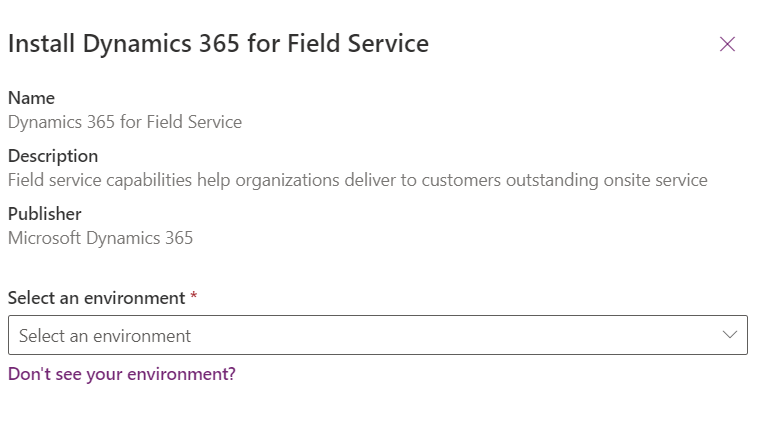
    4.Click on … then click on Install. It looks scary so I didn’t want to click until I was encouraged by Adrian (https://adriandynamics.wordpress.com/)

    Yes, Mira (https://onlinemgblog.wordpress.com/), you told me I have to press that button 😀

    Thanks to Adrian and Mira for helping me to find “the magic” button!

    Share this:

    • Share on LinkedIn (Opens in new window) LinkedIn
    • Email a link to a friend (Opens in new window) Email
    • Share on X (Opens in new window) X
    • Share on Facebook (Opens in new window) Facebook
    • Share on Telegram (Opens in new window) Telegram
    Like Loading…
  • Power Apps Portal: deactivating records from a portal via Web API

    Power Apps Portal: deactivating records from a portal via Web API

    September 13, 2020

    All the amazing docs, which help you to start are available here:

    https://docs.microsoft.com/en-us/powerapps/maker/portals/web-api-perform-operations#update-and-delete-entities-using-the-web-api

    https://docs.microsoft.com/en-us/powerapps/maker/portals/web-api-overview#web-api-operations

    I was testing the scenario where we had to workaround with the plugin: prior portal Web API times 🙂 it wasn’t possible to deactivate a record from a portal with a status different from the default one. Now it’s super easy!

    1. I added a new inactive status for a testing purpose:

    2. I updated Site Settings to include statecode and statuscode fields:

    3. I added a script to update the record I wanted to deactivate:

    	webapi.safeAjax = safeAjax;
    	})(window.webapi = window.webapi || {}, jQuery)
        if (confirm('Update?')) {
        alert('Thanks for confirming');
      webapi.safeAjax({
        type: "PATCH",
        url: "/_api/tk_inspections(e4c23961-61f5-ea11-a815-000d3ad20d1d)",
        contentType: "application/json",
        data: JSON.stringify({
          "statecode": 1,
          "statuscode": 821350004
     //Cancelled - custom new inactive value
        }),
        success: function (res) {
          alert("Yay!")
        }
      });

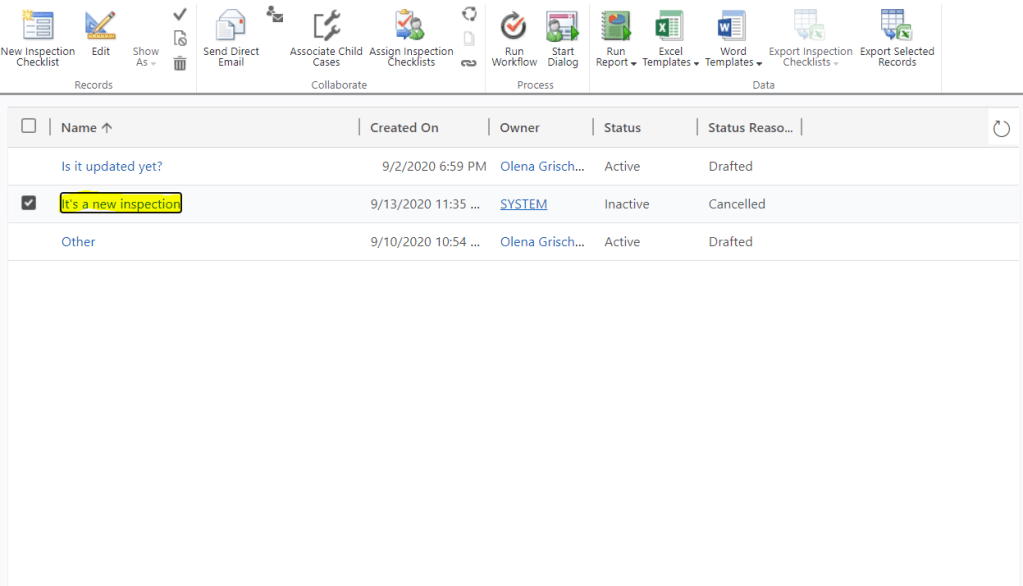
    4. It just worked! 😎

    Happy days!

    Share this:

    • Share on LinkedIn (Opens in new window) LinkedIn
    • Email a link to a friend (Opens in new window) Email
    • Share on X (Opens in new window) X
    • Share on Facebook (Opens in new window) Facebook
    • Share on Telegram (Opens in new window) Telegram
    Like Loading…
  • Power Apps portal Web API: (ERROR)An undeclared property … which only has property annotations in the payload but no property value was found in the payload…

    Power Apps portal Web API: (ERROR)An undeclared property … which only has property annotations in the payload but no property value was found in the payload…

    September 13, 2020

    UPDATED POST HERE: https://wordpress.com/post/msolenacrm.blog/2147

    Looking at Web API for portals this weekend. For the scenarios we currently workaround, with the API it’s all easy.

    There is a very documentation available which will help you to start:

    https://docs.microsoft.com/en-us/powerapps/maker/portals/web-api-perform-operations

    and here:

    https://docs.microsoft.com/en-us/powerapps/maker/portals/web-api-overview#web-api-operations

    When I was trying to bind a related entity on create I was getting the following error:

    “An undeclared property … which only has property annotations in the payload but no property value was found in the payload. In OData, only declared navigation properties and declared named streams can be represented as properties without values.”,”innererror”:

    The trick is to use a schema name for the attribute not a logical name. My was “tk_Spaceship”(schema name) vs “tk_spaceship”(logical). “tk_Spaceship” it is!

    webapi.safeAjax({
        type: "POST",
        url: "/_api/tk_inspections",
        contentType: "application/json",
        data: JSON.stringify({
          "tk_name": "It's a new inspection",
    			"tk_type": 821350001,
    			"tk_Spaceship@odata.bind":"/tk_equipments(dbc984df-b7e9-ea11-a817-000d3ad20d1d)"
        }),
        success: function (res) {
          alert("Yay!")
        }
      });

    Share this:

    • Share on LinkedIn (Opens in new window) LinkedIn
    • Email a link to a friend (Opens in new window) Email
    • Share on X (Opens in new window) X
    • Share on Facebook (Opens in new window) Facebook
    • Share on Telegram (Opens in new window) Telegram
    Like Loading…
  • Dynamics 365 CE: Investigating the conflicting business rules issue

    Dynamics 365 CE: Investigating the conflicting business rules issue

    September 8, 2020

    Recently, we run into the weird issue which we initially assessed as the upgrade to V9 related. The issue was that some form fields were aren’t marked as required based on the Account type based on the business logic. We use the unhealthy mix of scripts and business rules for the form logic. Also, we inherited most of the code from previous vendors. Luckily for me, I was reviewing and modifying JavaScripts to comply for V9 just this week. This is how I knew it was a business rule.

    I haven’t debugged business rules previously so this blog post absolutely saved my day:

    Troubleshooting Business Rules

    In our case, it wasn’t about missing on a form fields. It was related to two conflicting business rules. Funny that the issue wasn’t reproducible on PROD or UAT. We believe it’s due to the order in which the rules were activated.

    These are sets of the debug screenshots below:

    Ctrl+Shift+I to call Dev Tools in Chrome.

    To debug minified scripts:

    It’s all for the old UI and older Field Service version because we are still in the process of upgrading our system…

    Share this:

    • Share on LinkedIn (Opens in new window) LinkedIn
    • Email a link to a friend (Opens in new window) Email
    • Share on X (Opens in new window) X
    • Share on Facebook (Opens in new window) Facebook
    • Share on Telegram (Opens in new window) Telegram
    Like Loading…
Previous Page Next Page

Create a website or blog at WordPress.com


Loading Comments...
 

    • Subscribe Subscribed
      • Olena's Dynamics Blog (post-AI)
      • Join 60 other subscribers
      • Already have a WordPress.com account? Log in now.
      • Olena's Dynamics Blog (post-AI)
      • Subscribe Subscribed
      • Sign up
      • Log in
      • Report this content
      • View site in Reader
      • Manage subscriptions
      • Collapse this bar
    %d