Olena's Dynamics Blog (post-AI)
Writing as a human
Category: Power Platform
-

This error for me occured when I was copying scripts and using blank queries. This is not my image, not my database, so don’t try to access it, please 😀 I found it in Internet to illustrate the point. This message is a little bit a lot not helping. If you deploy something to PROD…
-

This article is using a test data because using customer data is wrong. The rest is very practical stuff. If you don’t use Dataflow for Power Apps still I think you should. I am trying to solve a typical problem. We’ve got a Choice column Business Type for Account (for example). We need to remove…
-
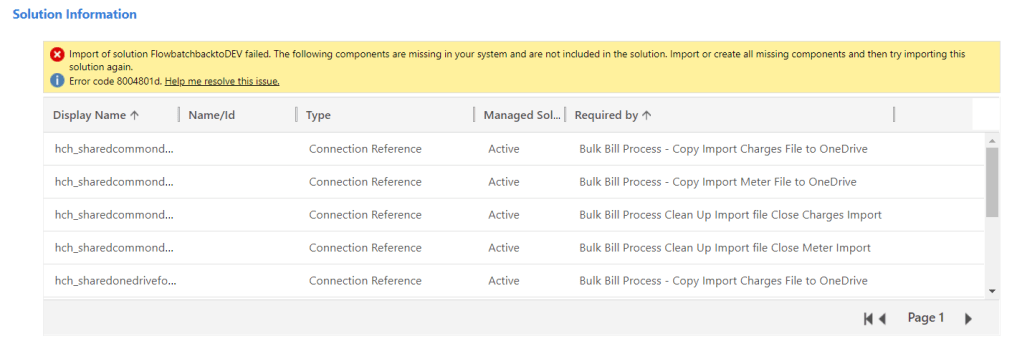
In the morning i tried to bring back some stuff from UAT. When I tried to import my solution back to DEV I was getting errors. My solution contained Flows. Why do I use the classic admin interface to import solutions? Read this article: https://wordpress.com/block-editor/post/msolenacrm.blog/1608 I went the classic interface to import the solution. I’ve…
-

UPDATED POST HERE: https://wordpress.com/post/msolenacrm.blog/2147 Looking at Web API for portals this weekend. For the scenarios we currently workaround, with the API it’s all easy. There is a very documentation available which will help you to start: https://docs.microsoft.com/en-us/powerapps/maker/portals/web-api-perform-operations and here: https://docs.microsoft.com/en-us/powerapps/maker/portals/web-api-overview#web-api-operations When I was trying to bind a related entity on create I was getting the…
-

The real-life scenario: a portal user (agency) indicates that they don’t manage a particular property anymore. The action is performed via self-service portal. From a user experience perspective, the property has to “disappear” from the list of active properties immediately after “no manage” action is performed. If we choose to use Deactivate as an action…
 Olena's Dynamics Blog (post-AI)