Olena's Dynamics Blog (post-AI)
Writing as a human
Category: Business Applications
-
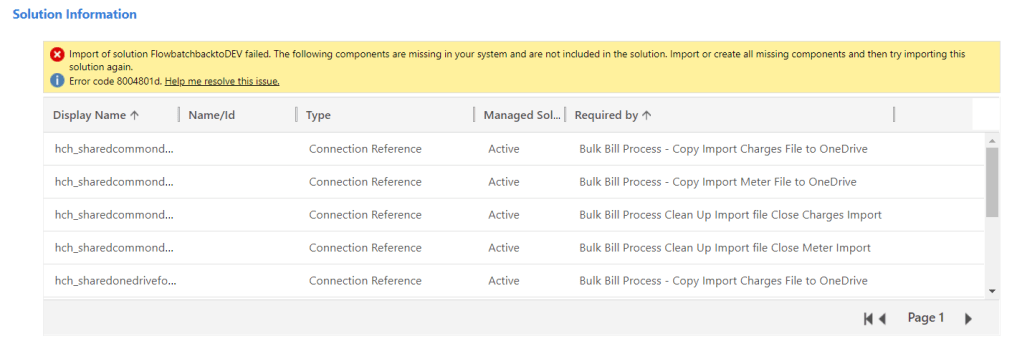
In the morning i tried to bring back some stuff from UAT. When I tried to import my solution back to DEV I was getting errors. My solution contained Flows. Why do I use the classic admin interface to import solutions? Read this article: https://wordpress.com/block-editor/post/msolenacrm.blog/1608 I went the classic interface to import the solution. I’ve…
-

I was importing my unmanaged solution then the error has occurred. I was using a new UI. After spending some unpleasant time researching and trying different things I came across this post in the Hosk’s blog: https://crmbusiness.wordpress.com/2020/06/02/dynamics-365-solution-error%e2%80%8a-%e2%80%8acomponents-are-missing-import-the-managed-solution-with-these-components-active/ Thank you very much, Hosk, you are truly marvelous! I realized that I have to switch to the…
-

In my Dataflow you would like to query CDS data. This is how I you it. Click on New dataflow and enter the name. On the next screen on the tab Other select Web API. Go to your model-driven app Advanced Settings. Select Customizations -> Developer Resources. Copy Instance Web API Service Root URL. Paste…
-

When you clicked on the magic button which you found here how do you monitor the progress? In the Power Platform admin center go to Environments. In the list of environments click on the environment you are upgrading Field Service on: https://admin.powerplatform.microsoft.com/environments From Resources click on Dynamics 365 apps … Enjoy the progress!
-

With the new Power Apps admin portal if you want to upgrade the Field Service solution you have to do the following: Go to Power Platform Admin center: https://admin.powerplatform.microsoft.com/ 2. From the left navigation Resources -> Dynamics 365 apps: 3. Select Dynamics 365 Field Service. 4.Click on … then click on Install. It looks scary…
 Olena's Dynamics Blog (post-AI)