Olena's Dynamics Blog (post-AI)
Writing as a human
Author: Olena Grischenko (she/her)
-

I’ve been working with portal for so many years that every time something like this is happening I feel like dying of emberrasement. For my demo entity list, I couldn’t get the Edit button to appear and I knew, I knew it was about Entity permissions. You need to make sure you set up your…
-

Don’t be like me! This is the JavaScript: var uriClientLegacy = “?$select = cca_legacyservicefee, defaultpricelevelid & $filter=accountid eq ” + clientLookupId; Xrm.WebApi.retrieveMultipleRecords(“account”, uriClientLegacy).then( function success(result) { … }, function (error) { console.log(error.message); // handle error conditions alert(error.message); }); And this is the execution result: {“error”:{“code”:”0x0″,”message”:”The query parameter $select is not supported”,”innererror”:{“message”:”The query parameter $select is…
-
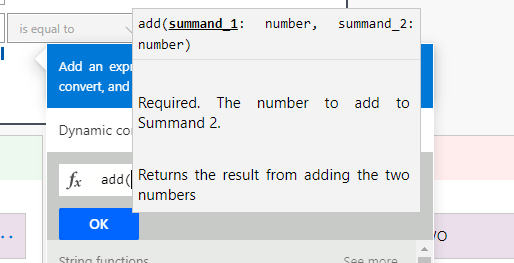
The requirement is to summarize 4 number field values to determine if the total is greater than 0. What could possibly go wrong? You think it should be somewhere in the Expression under Math functions. Think again. The add only allows to summarise 2(!?) numbers. Not 3, not 4. It let me to add extra…
-
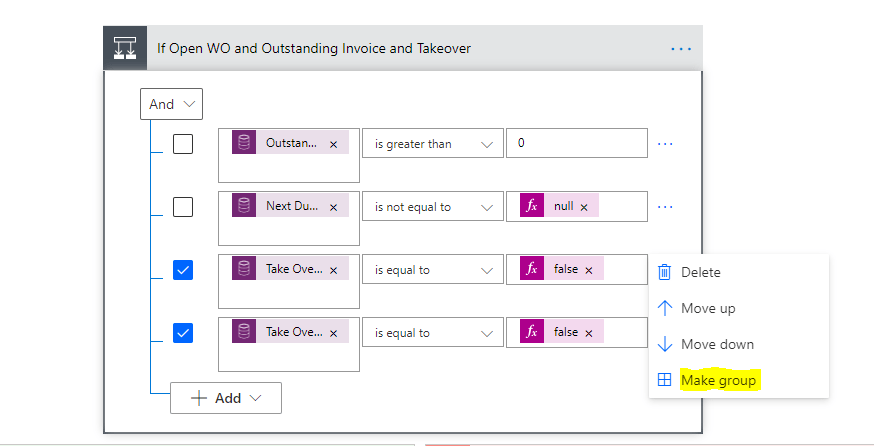
It’s not even a post … Just saying I was wondering how simple is to group or ungroup conditions in the Condition action block. Very simple! From Scratch For existing – Group For existing – Ungroup It seams pretty obvious but I wasn’t sure it exists in a user-friendly manner. It does!
-

The real-life scenario: a portal user (agency) indicates that they don’t manage a particular property anymore. The action is performed via self-service portal. From a user experience perspective, the property has to “disappear” from the list of active properties immediately after “no manage” action is performed. If we choose to use Deactivate as an action…
 Olena's Dynamics Blog (post-AI)