• The Good, the bad and the ugly a web form validation.

    It’s happened to everyone at least once, more than once, many times. It’s happened to you if you like online shopping if you have to fill up an online form, make a claim, if you ask questions… Welcome to the world of painful form validation!

    Just think: you don’t need to attract those people to your website, you don’t need to pay for the marketing campaign or write your name in the sky with an airplane to get them to your website – you did it, all those people are already your customers. They came to your website to fill in their contact details or pay for an order, they came to PAY YOU MONEY. And they all will walk away to never come back. The only reason for this is your ugly web form validation.

    Do you know how many online sellers didn’t let me pay for a service or product? My absolute champion is the website selling subscriptions to magazines, the only one in Australia. That’s why I had to come back 5(!) times to fill in the form. Did I have another option? No, I just needed it, it was a Father’s Day present from my kids to their dad, so I had to fight to the end.

    If you don’t know why you need that form validation, don’t put it on the form. If you know for sure you need it, think twice. What are you getting in a worst case scenario? How many “broken” records do you expect to receive?  Could you compare it to the number of customers walking away?  Can you fix it at the backend, can you do some smart coding to avoid it? If yes, then do it!

    Don’t stop people from submitting a form. If you need to say something, display a WARNING. Give people some options to correct, then let them submit that form, already.

    Another way to be user-friendly is to notify users about your expectations. If you expect this field to be mandatory, why this remains a secret to a user till the end. Boom! “Invalid format”! What’s the valid format, again? If you hate masked fields, display some friendly format suggestion: “Please enter your 7 digits code in a format xx-xxx-xx”. Make your customer happy, it doesn’t cost much.

    The great and effective way to validate address is to use some address validation add-ons. There are some for CRM as well, Google it. It helps a lot, you don’t need to clean up data after, you just get it right before. It’s good for you, it’s good for users.

    The ugliest among all ugly validations – a phone number validation. Well, I understand the complexity of the task: too many countries, formats, variations – landlines, mobiles. Then, too bad – don’t validate it at all! I don’t believe in phone number validation, it’s evil. What have I done to you so you do this to me? Why do you “phone-validate” my contact details to stop me from giving away my money? I tried to give it to you, but you said: “NO! I don’t need your money! All I need is to get your phone number my way.” No hints, no tips, just one red “Invalid format” message. “OK, OK, you won and I lost. And I am walking away with my money”

    Have you ever tried a Google Chrome auto-population for the form fields? Recently, I tried it with one of the university course enrollment forms. And I failed again. It’s complained, that my Australian phone number was in a wrong format. The Australian web form on the Australian website didn’t recognize the Australian phone number format from my cookies. I need the T-shirt saying “I failed a web form validation. Again.”

    I am a web developer myself, so I am guilty too, I admit it. But if I need to sell something online, one day, I will remember to tell this myself: “If you sell products or services, if you have a website with any types of forms to pay, talk or register, don’t stop your customers from giving you their details or money, or information. Let them make their mistakes or put a bit more effort to transform your form validation from the ugly into the good.”

  • Dynamics 365 Portals : Sign Out Issue

    The issue: unable to Sign Out from Dynamics 365 portal.

    Symptoms: logged in portal user remains signed in even after signing out from the portal.

    This is, actually, a very convenient “feature”, if you always work with a portal from your personal computer (like I do). However, if you share the same desktop with your colleagues, you may want log out from the portal, once you’ve finished your session. Unfortunately, it wasn’t an option till the last week.

    We were happy to receive the following email from Microsoft:

    Hi Olena,

    Good day.
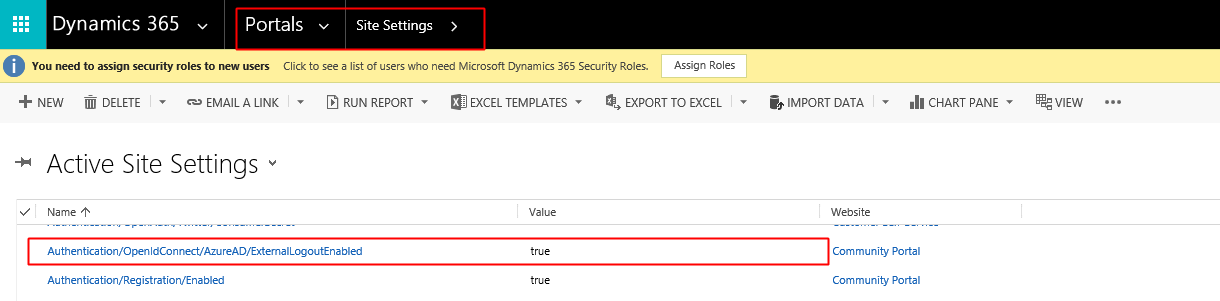
    As confirmed by PG, we need t configure below value in Portal -> Set Settings for external logout.
    Set “Authentication/OpenIdConnect/AzureAD/ExternalLogoutEnabled” = true

    portal_signout

    I have tried on my testing environment, it works. Please feel free to apply this solution on your end. If you have any question, feel free to let me know. 

    Thanks,

    I went to test this on our portal. It seems to be working now.

  • “Does your new CRM allow to create a new customer report?”

    Last week we went for the demo to one of the potential customers. Generally, it all went well. I was talking a lot about new features of MS CRM 2016. I like showing new functionality to my customers, it’s incredible how the system changed in a past 10 years.

    In the middle of the demo, one of the managers asked me that question. He said: “Well, I can see that a new version is better in many ways. But can it solve my problem? The old one couldn’t solve it.

    *Does your new CRM allow to create a new customer report?*

    My boss and I became speechless for 30 seconds. Then we started talking the same time trying to figure out what exactly he meant.

    “What do you mean?”

    Well, after the short spontaneous 5 minutes workshop we discovered that “a new customer” issue is related to the way data got imported into the system. After the import, for some reason, all accounts in the system became new, so there is no way to identify which account is old and which is not by just looking at the Create Date.

    So many questions popped up in my head after the conversation but I haven’t asked them that day. I believe I even tried to suggest something which wasn’t 100% right. Clear as a day that the issue was not about an old system is not good, no. This is about something else. The customer may think that your system or their system is rubbish because it doesn’t solve the problem.  But, in reality, all the customer needs is some sort of training or guidance. Not the system itself, but the way it’s being used caused the problem.

    What happens to the system after Go Live? Are your customers trained enough to use it? Does anyone own it? The end-user adoption is a very important thing which requires some of your attention. The system is not 100% alive if no one uses it or it’s not being used the way it supposed to be used, no matter how good it is.

    Trying to combine my own thoughts about this topic I googled a bit and found a very good article here: http://www.crmsoftwareblog.com/2015/04/5-proven-user-adoption-tips-microsoft-dynamics-crm/. Most of the statements I have already had in my mind and some are valid but they are difficult to implement. I listed them here below with my comments.

    Define your business processes early in the planning phase, and implement Dynamics CRM around them.

    Sometimes customers cannot define their own processes from the beginning. For them, it’s an interesting journey and the opportunity to discover a lot about their own business. Don’t be surprised to hear “we don’t have any processes” and be prepared to help them to figure things out before you start implementing it in CRM.

    Involve your end users from start to finish, and then involve them again.

    This is a good one. For me, the main reason why it works so well is that they got attached to the things they spent so much time and effort for. They are not just owners, they are builders and creators. They feel personally involved and responsible for the product.

    Follow up consistently with end users after the solution is implemented.

    This is about managing customer expectations. It’s a very important and continuous process. People tend to forget things so we have to come back and repeat; again and again. 

    Identify the metrics to help you demonstrate success.

    True. Which problem does it solve and how do we measure the results? It’s not always about figures. What are their benefits from using the system? For example, before the implementation, it was difficult to report on the data because all records were only on paper. Previously we cannot report and now we can. Not everything is that easy to measure but this is definitely a good option.

    Encourage buy-in and user adoption from all levels of management.

    I am sure we all understand that it’s a right thing to do but it’s not always possible. In the ideal world, you have your consultants working with the customer on different levels: sales directors at the level of top managers, project delivery managers working with the customer delivery team and support consultants helping end users; not mentioning functional consultants training and capturing the feedback to identify new opportunities.

    You may have your own bullet points in the list but it’s clear the following is the key thing if you plan to have a long-term relationship with the customer.  If the customer knows the system then he uses the system, if he uses the system he loves the system, if he loves the system he comes and asks for more. Even if it needs some improvements, it may not be perfect but it needs to be of use. In this case, if something is not 100% working they will ask to repair not to replace it with a better one.

  • MS CRM Development: coding vs no-coding solutions

    I have been working with Microsoft CRM from version 1.2. As a developer, of course. The CRM development is my bread and butter, my passion and my Superhero playground.

    However…

    Most of the times I was getting my daily “YOU ARE A GENIUS!” brownie points for something which has nothing to do with the actual coding but more related to the problem solving and common sense. I developed (Yes, I still love that word) the healthy habit: to think no-coding first.

    If you are a developer and spend most of the time programming you start to think coding and limit yourself to “coding for the sake of coding”. It’s cool if your main goal is to produce the best-looking code in the world. What if coding is just one of many tools and your main goal is to solve the problem in the best possible way?

    Thinking no-coding is a good brain training exercise. It’s also the entropy reduction so it’s truly environment-friendly and Zen friendly activity.

    I am giving you some reasons why you need to code for CRM:

    • You don’t understand what customer NEEDS but going with what customer WANTS.

    How often do you have the customer coming to you and saying: “You know, mate, I need a new button here! I was thinking about it last week – I really need it, mate, how long do you think will it take you to build it? It’s an easy 5 minutes job! ”? Well, too often in my world. How many times you said “yes” without asking:” WHY? Why do you need that button?” The answer would surprise you: the functionality he asked for was out-of-the-box sharing or something like this. Don’t let your customer design solutions for you.

    • You don’t like to say NO (go unsupported).

    Sometimes you think you have to code but in reality, all you have to do is just to explain to a customer why it’s not such a good idea to have “that grid looking sparkly with green stripes and our company logo on top”.  Talk to them consequences and costs, and timelines or talk future CRM updates and broken systems. Even if all you care about is money find a better way to get them. I believe Microsoft CRM is changed a lot from version 1.2. I remember days when the only possible way to customize CRM was via a database. It’s all different these days.  And, yes, a customer can have their logo in the top left corner and change the color of the background in CRM 2016 without using unsupported coding the which is great.

    • You don’t know what out-of-the-box CRM can do or don’t understand the CRM architecture.

    Well, it’s not possible to know everything. Google it! Read, think about it more and certainly there is a possibility that you will find some existing CRM feature at the end. Always try to solve the problem using out-of-the-box CRM first then, if nothing is coming up,

    • You just need to code.

    At last! There cases when you cannot avoid coding and it’s the smart way to solve the problem. If this is the best solution for everyone then go for it!